Send a test
Send the saved version of a template to a test group or to up to ten addresses, and read the result for each recipient.
A test send delivers the saved version to real recipients so you can see it on a device or in an inbox. In Live, a test send on the version is required before you can publish.
Before you start
- Save the template. The test sends the saved version.
- Create a test group, or have the addresses ready.
- A provider for the channel must exist in the environment. The demo workspace has no providers, so nothing is delivered there.
Steps
Open the template and select Test send at the top right.
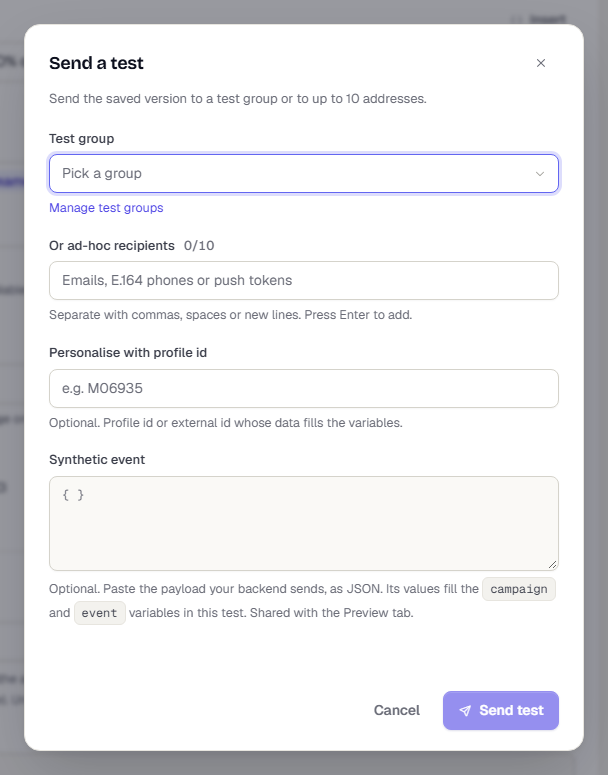
Choose a Test group. The list shows each group's member count. Select Manage test groups to open the test groups page.
Or type recipients under Or ad-hoc recipients: emails, E.164 phone numbers or push tokens. Separate them with commas, spaces or new lines, and press Enter to add each one. You can add up to 10.
Optional: in Personalise with profile id, enter a profile id or external id whose data fills the variables. Members who are linked to a profile use their own data.
Optional: in Synthetic event, paste the JSON your backend sends. Its values fill the
campaignandeventvariables in this test. The box is shared with the Rendered preview tab.Check the line at the bottom left, such as Sends to 3 members of Growth team and 1 pasted recipient., then select Send test.
What happens next
A toast says Test send queued, and the dialog switches to Test send results. Each recipient has a status: Queued, Accepted by provider, Delivered, Failed or Skipped. A failed or skipped row says why. When more than one provider was tried, expand providers tried to see each attempt. The results refresh every 2 seconds for up to 30 seconds. Accepted by provider means Apple or Google took the push. If it does not appear, check the device's notification settings. Select Send another to go back to the form, or Done to close it.
The version records the time of its last test send, and the Test send done item in the publish gate is ticked. See Versions, checks and publishing.
If a group has no members, the dialog warns you. If none of a group's members is linked to a profile, give a profile id so the test has real data to render with.
Related
Was this page helpful?