Analyze, target and message every customer

Reach every customer on push, WhatsApp, email, SMS, RCS and in-app Dashboards, segments, campaigns and flows on one data model, with one send gate, Test and Live kept apart, and a reason for every message that did not go out.

  • No credit card
  • Data hosted in India
  • SDK key in 2 steps

// One platform, five product areas

00 Why TrueEngage

One data model. One send gate. Every channel in step.

Build a segment once, then reuse it in campaigns, flows and dashboards.

01 How it works

Follow one event all the way to a message.

  1. 01Event

    Your app sends it once.

    Web, Android, iOS and Flutter SDKs, the public API and CSV imports all use the same event names.

    checkout.ts1TrueEngage.track('Order Placed', {2 amount: 2941,3 currency: 'INR',4 city: 'Pune',5});
  2. 02Profile

    It lands on one profile.

    Events, attributes, devices and consent live on the same record, so every tool reads the same customer.

    MK
    Meera K.u-1001 · Pune · Asia/Kolkata
    • Orders4
    • Last orderjust now
    • Pushreachable
    • WhatsAppopted in
  3. 03Segment

    She joins the right audience.

    Rules on behaviour and traits, with a live count. Build a segment once and reuse it everywhere.

    Recent buyers
    AND Order Placed at least 1 time in the last 30 days
    AND city isPune
    Meera matches
  4. 04Send gate

    Every message is checked.

    Consent, frequency caps, quiet hours and rendering are checked before anything goes out, on every channel.

    Consent Frequency cap Quiet hours Render Allowed · push
  5. 05Message

    And reaches her phone.

    Push, WhatsApp, email, SMS, RCS or in-app. Each send is tracked through delivered, opened and clicked.

    10:42
    Your order is on its way₹2,941 · arriving Thursday
    DeliveredOpenedClicked
02 The platform

Five product areas. One console.

Real screens from the TrueEngage console, not mockups.

Analyze

Dashboards · reports · funnels · RFM
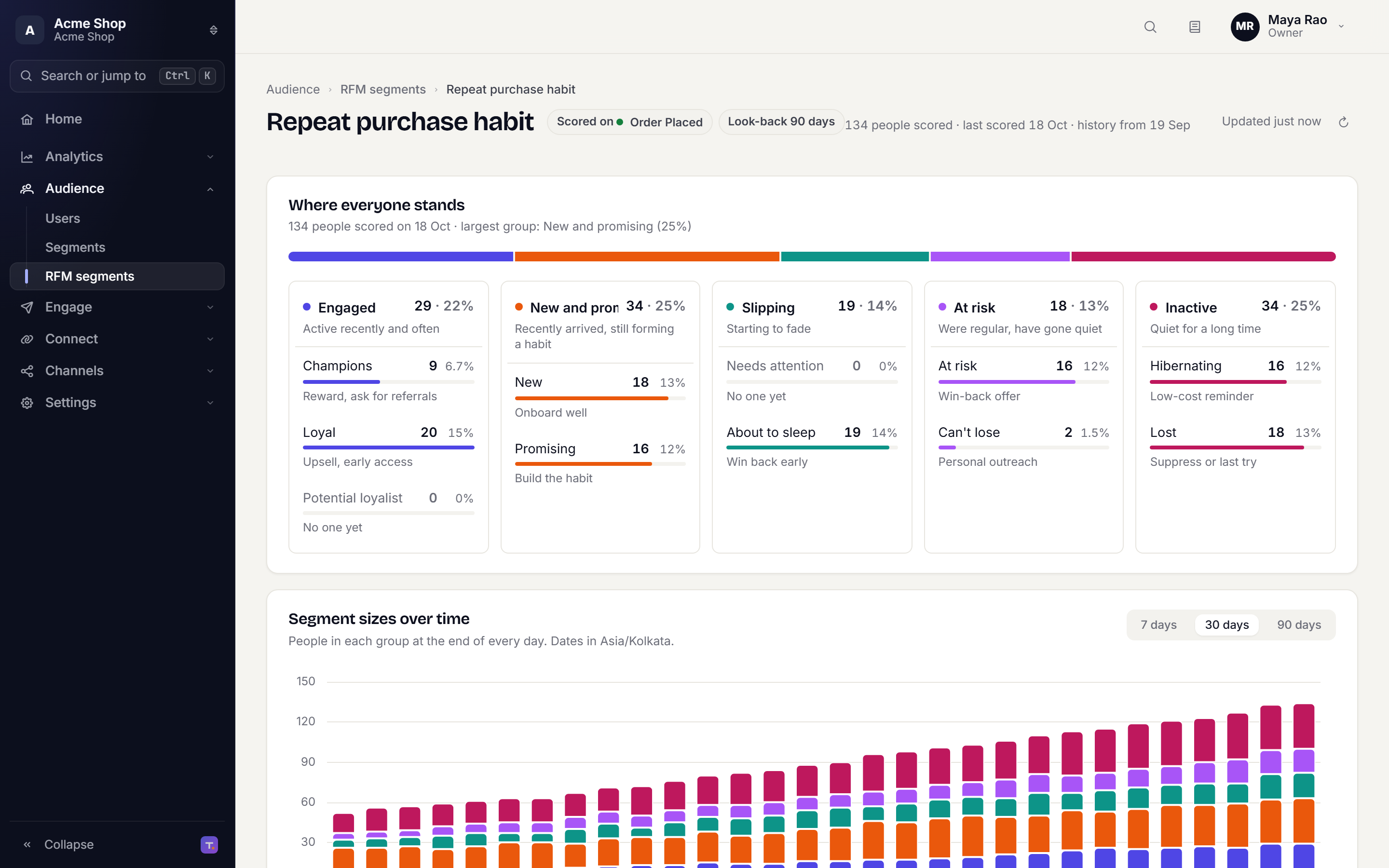
RFM segments page: five groups from Engaged to Inactive with their sub-groups and sizes

See what customers do, which group each one is in and which messages moved them.
  • Dashboards and reports
  • Funnels
  • RFM segments scored daily

Audience

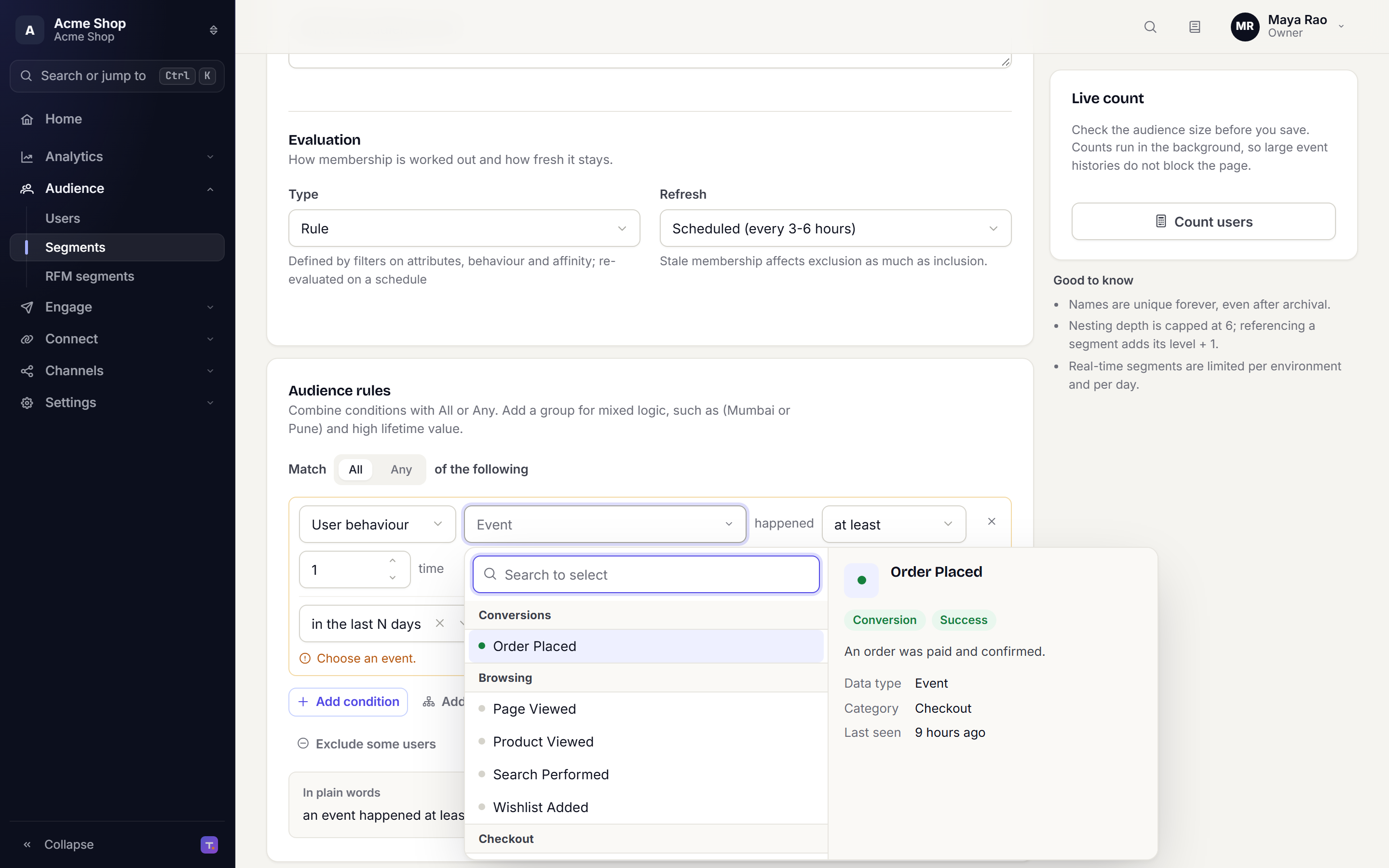
Profiles · segments
Segment editor: audience rules with an event picker open on Order Placed

One profile per customer and segments on behaviour and traits, with a live count before you save.
  • User profiles with activity
  • Rule-based segments
  • Nested segments

Engage

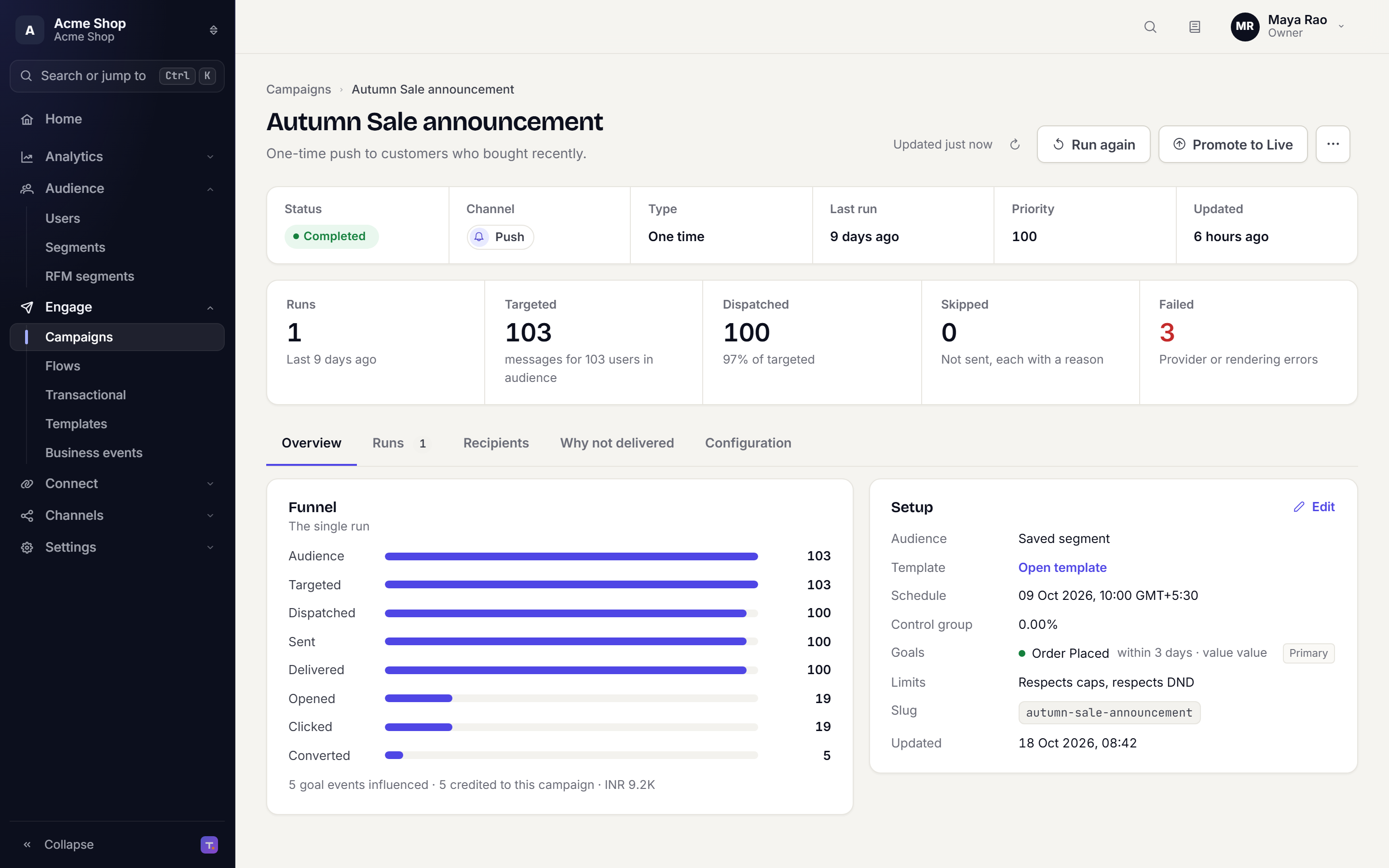
Campaigns · flows · templates · channels
Campaign overview: runs, targeted, dispatched, skipped and failed, with a funnel from audience to converted

One-time, recurring and triggered campaigns, multi-step flows, and templates for every channel.
  • Campaigns and flows
  • Templates per channel
  • Provider routing

Connect

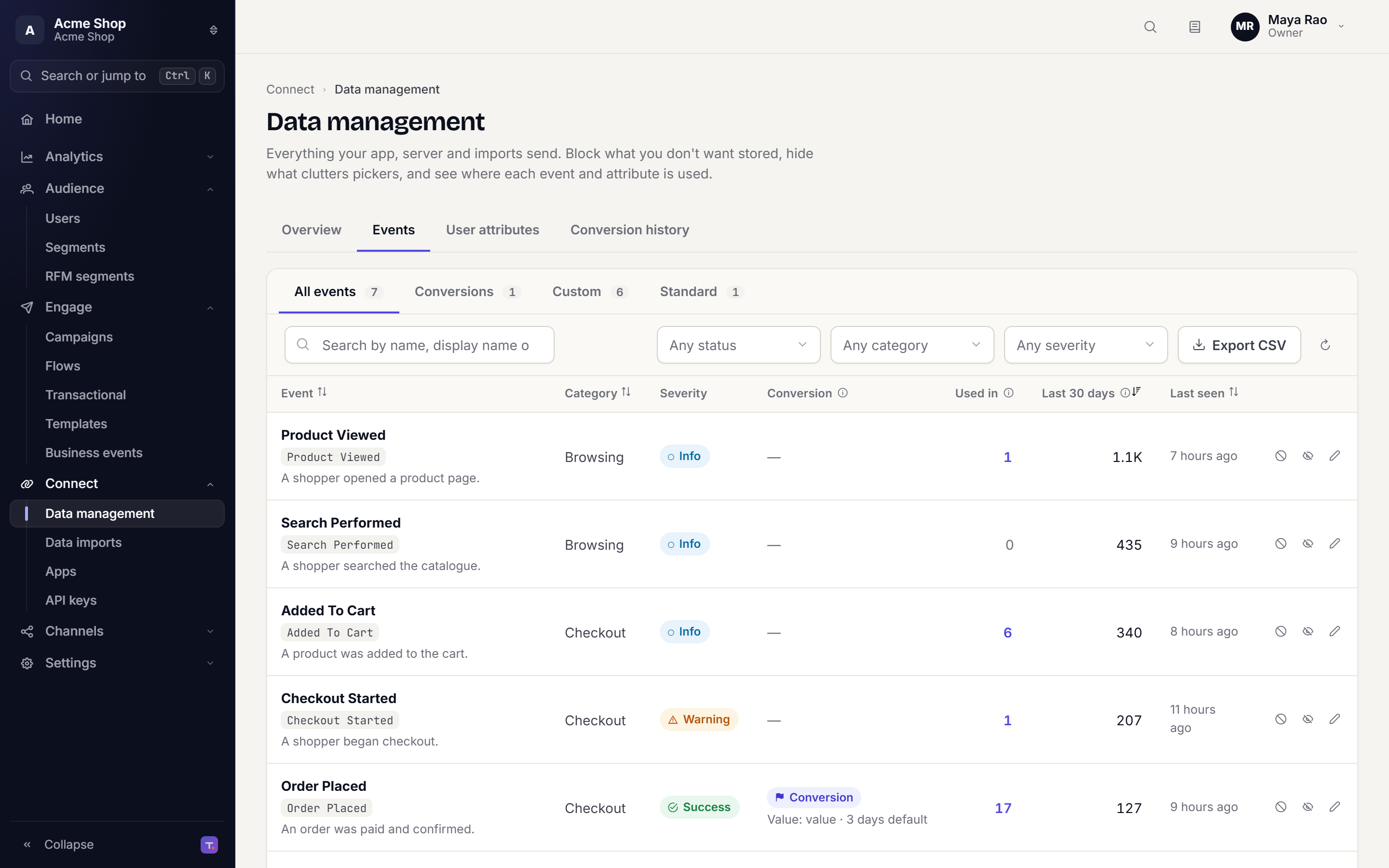
4 SDKs · API · apps · imports
Data management page listing events with category, severity, conversion flag and volume

Web, Android, iOS and Flutter SDKs, a public API, app registration and CSV imports, all into one event model.
  • Four SDKs at 0.3.0
  • Public API
  • CSV imports

Govern

Test / Live · roles · consent and unsubscribe
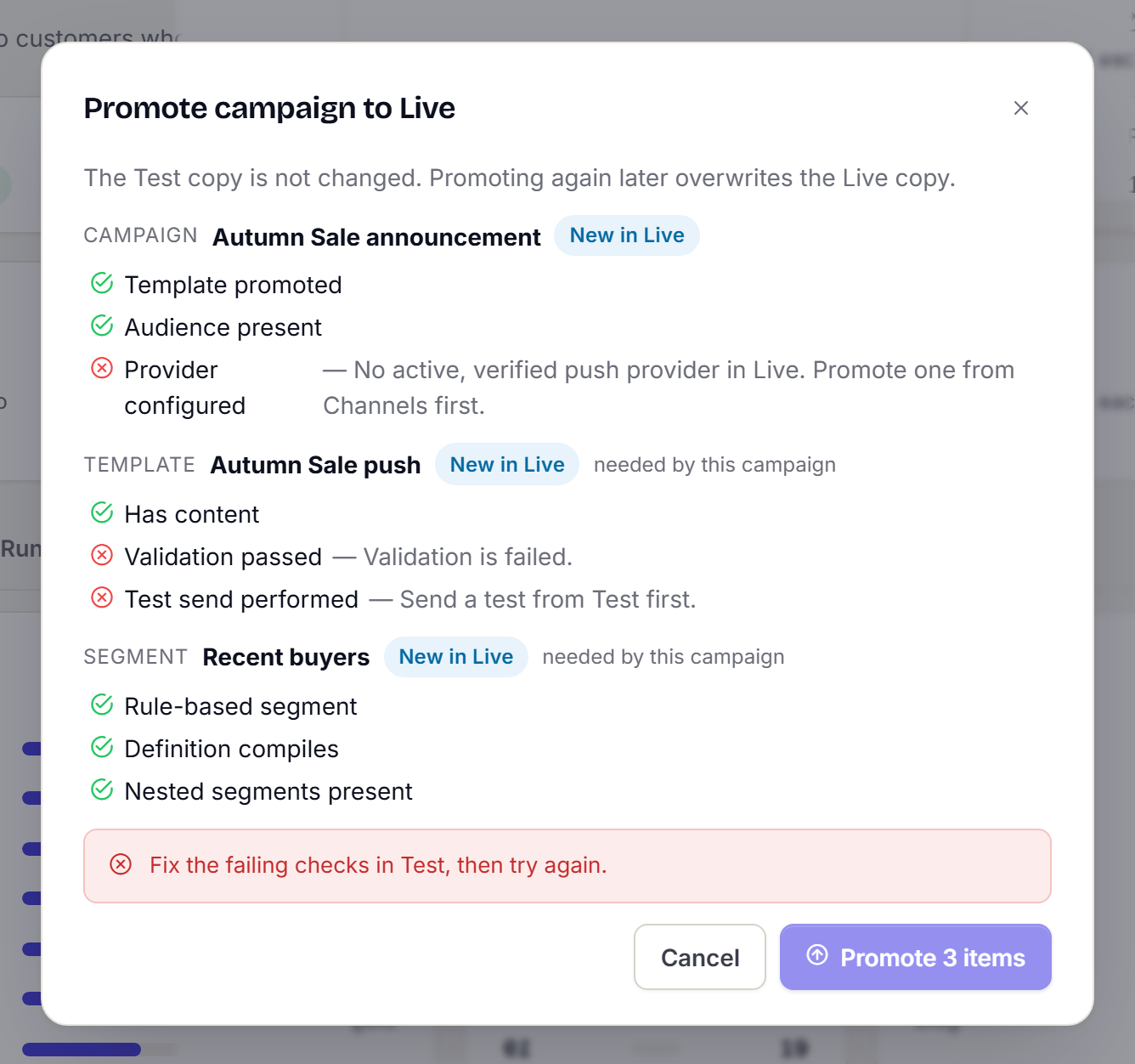
Campaign page behind a Promote to Live dialogPromote campaign to Live dialog listing each passed and failed check

Test and Live kept apart, promotion with checks, roles per member, and consent and unsubscribe on every send.

  • Test and Live environments
  • Roles and permissions
  • Consent and unsubscribe
03 Channels

Every channel. One routing layer.

Vendor adapters on a single contract. Route by country, weight across vendors and fall back on failure.

Routing rule country = INGupshup70%Twilio30% fallback: Infobip
PushFCM, APNs, Huawei, browser
WhatsAppTemplate sync, 24-hour window
EmailMJML editor, 19 pre-flight checks
SMSDLT-aware, Unicode-aware
RCSRich cards and suggestions
In-appContextual, priority-resolved
CardsInbox feed with state
WebhookAny endpoint is a channel
04 Built in, not bolted on

Guardrails that ship with the platform.

The checks teams usually add later sit in the send path from the first message.

  • send gate

    Consent checked on every send

    Before any message leaves, the send gate checks consent, frequency caps, quiet hours and DND for that recipient.

    • Consent
    • Frequency cap
    • Quiet hours
    • DND
  • environments

    Test and Live kept apart

    Separate keys and data. Templates, segments and campaigns move to Live by promotion, through gates.

  • campaign runs

    A reason for every skipped send

    Every recipient who was not sent to carries a reason in the campaign run.

  • sdks

    Four SDKs, one event model

    Android, iOS, Web and Flutter share one event and identity model.

  • hosting

    Data hosted in India

    Workspace data is stored on servers in India.

05 Developers

Four SDKs, one API

Instrument once and every campaign, journey and dashboard reads the same events. Your backend talks to the same pipeline through the public API.

import TrueEngage from '@trueengage/web';

TrueEngage.initialize({ appKey, dataRegion: 'in' });
TrueEngage.identify('u-1001', { city: 'Pune' });
TrueEngage.track('Order Placed', { amount: 2941 });
npm i @trueengage/web
202 AcceptedOrder Placed · processed in the background
  • Events, identity and push on every platform, with an offline queue and the same event names
  • Device location only when you opt in, and consent per scope
  • A public API for events, transactional sends, business events, flow entry and identity promotion
  • A Test key can never write Live data

Version 0.3.0 on every platform

  • Webnpm i @trueengage/web
  • Androidio.trueengage:trueengage-android:0.3.0
  • iOSpod 'TrueEngage', '~> 0.3'
  • Fluttertrueengage_flutter: ^0.3.0

Ship your first flow this afternoon.

Sign up, create a workspace and send an event with the SDK key you get on screen. Test stays sandboxed until you promote to Live.