Routing and rules
Decide where a smart link sends people by platform and app state, add country and platform rules, and understand fallbacks and redirects.
Routing answers two questions for every click: what device is this, and does it have your app? Rules add a third: where is the person, so some clicks can go somewhere else.
Routing is set on a template and can be overridden on a single link. Rules can be set on a template or on a link.
What is supported
| You may expect | In TrueEngage |
|---|---|
| Different targets for iOS, Android and a computer | Yes, in Routing. |
| Different target when the app is installed or not | Yes, in Routing. |
| Country, region and platform rules | Yes, in Rules. |
| Expire a link on a date or after N clicks | Yes, under Advanced > Expires. |
| Language or time-of-day rules | No. |
| Split traffic between destinations (A/B test) | No. |
| Password protected links | No. |
| 301 or 307 redirect | No. See Redirects. |
Routing
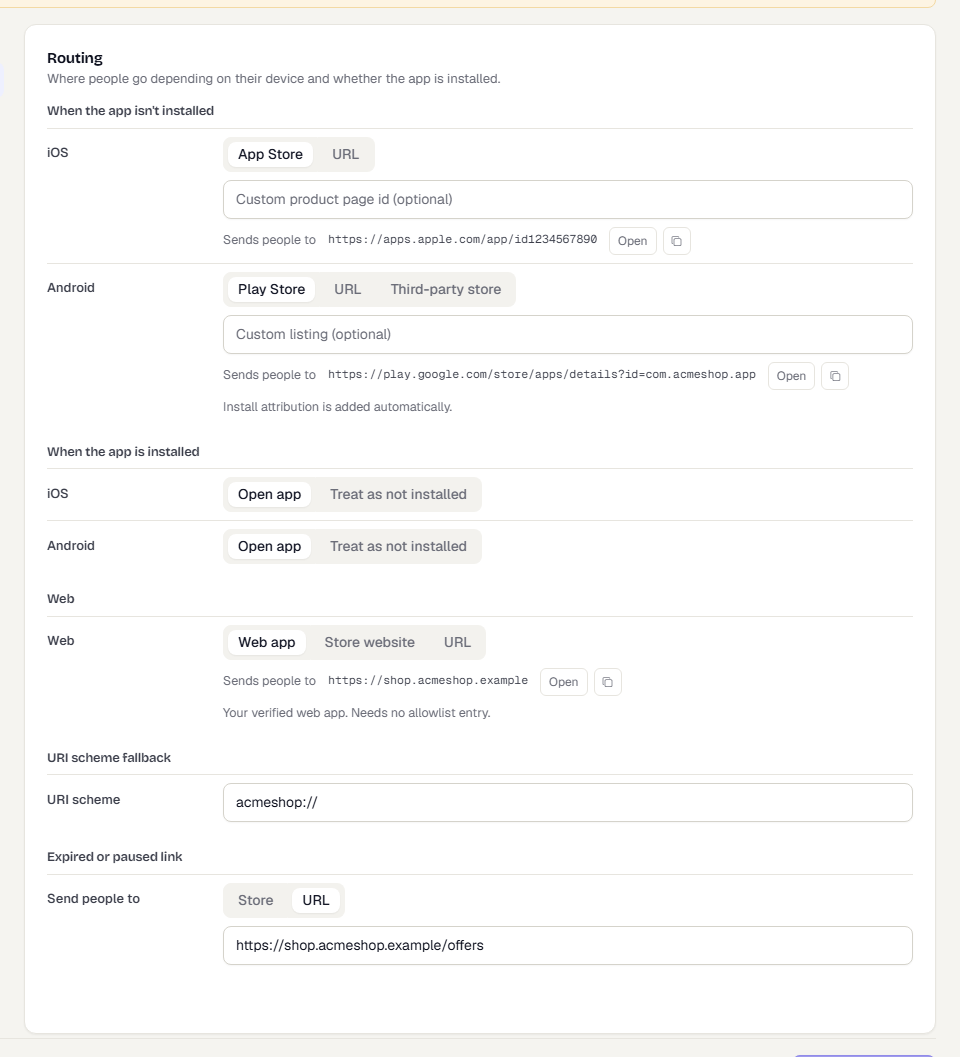
Open Smart Links > Templates, choose a template, then Routing. On a single link, open the link builder and choose Routing. On a link every row starts as Template default and shows an overrides template dot when you change it. Restore template settings clears every override.
When the app isn't installed
| Platform | Choices | Notes |
|---|---|---|
| iOS | App Store, URL | An optional Custom product page id sends people to an App Store custom product page. |
| Android | Play Store, URL, Third-party store | An optional Custom listing picks a Play Store custom listing. Install attribution is added to the Play Store address for you. |
Store addresses are built from your registered apps. You cannot type one, so a link cannot send people to a look-alike store page. If an app is missing its App Store ID or package name, the form tells you and links to Fix in Apps.
When the app is installed
For iOS and Android choose Open app or Treat as not installed. The second sends everyone through the "app isn't installed" route even if the app is there, which suits a link that must always open a web page.
TrueEngage cannot see from the server whether an app is installed. Where the operating system opens the app directly (universal links on iOS, app links on Android), the app opens before TrueEngage is involved. When it does not, Android uses an app-launch address with the store as a fallback, and the URI scheme (below) is the fallback on iOS.
Web
For visitors on a computer, or on a platform with no app:
| Choice | Where it goes |
|---|---|
| Web app | The verified web app registered in Connect > Apps. It needs no allowlist entry. |
| Store website | The App Store page, or Google Play when there is no iOS app. |
| URL | A web address on your redirect allowlist. |
URI scheme fallback
A scheme such as acmeshop://, with nothing after the slashes. It is tried when an iOS device does not open the app directly. http, https and other web or script schemes are refused.
Expired or paused link
Choose Store or a URL. This is where people go when a link has expired, reached its click limit, or is paused or archived.
Other clicks
Not every request is a person.
- Link previews and bots. Chat apps and social sites fetch the link to build a preview. They receive a small page with your Social preview (title, description, image). They are not redirected and are not counted.
- In-app browsers. Instagram, Facebook, LinkedIn, Snapchat, Pinterest, X, WeChat and Line open links in a browser that blocks the hand-off to your app. If the Landing page is on, those visitors see it, and its button opens the link on the alternate host, which iOS follows into the app. If it is off, they follow the normal route.
Rules
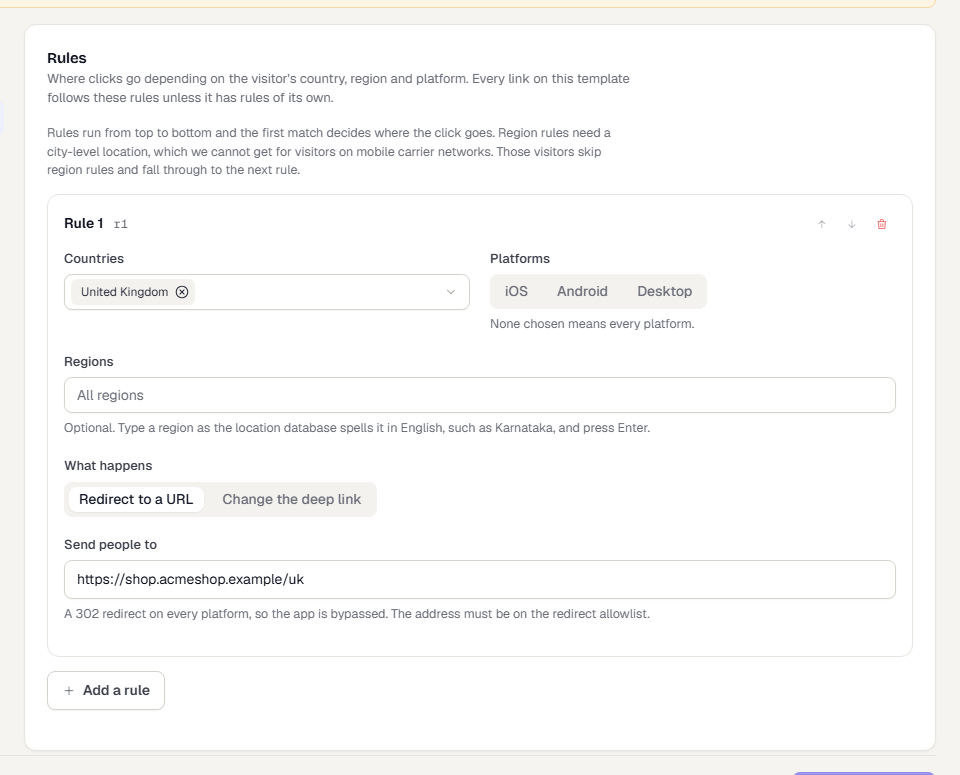
Rules send some clicks somewhere other than the normal routing. Open Rules on a template, or the Rules tab of a link.
Each rule has:
| Field | Meaning |
|---|---|
| Countries | One or more. The click matches if the visitor is in one of them. |
| Platforms | iOS, Android or Desktop. None chosen means every platform. |
| Regions | Only when exactly one country is chosen. Type the region as it is spelled in English, such as Karnataka, and press Enter. |
| What happens | Redirect to a URL or Change the deep link. |
- Redirect to a URL sends every platform to that address with a 302 and skips the app. The address must be on the redirect allowlist.
- Change the deep link keeps the normal routing, so the app still opens, but delivers the value you enter instead of the link's own deep link value.
How rules are evaluated:
- Rules run from top to bottom. The first match decides. Use the arrows to reorder. A link can have up to 20 rules.
- Rules run before routing.
- Rules on a link replace the template's rules. They are not merged. On the link's Rules tab, Use the template's rules switches back.
- Country and region come from the visitor's network address. For visitors on a mobile carrier network, TrueEngage cannot tell the region. They skip rules that name a region and fall through to the next rule.
- Each click records which rule decided it. The link's Overview shows a Rules breakdown. See Link analytics.
Expiry
Under Advanced > Expires a link can end on a date, after a number of clicks, or at whichever comes first. The click count only counts people. Bots and link previews do not count, so a count of 1 makes a true one-time link. After the end, clicks go to the template's Expired or paused link target.
Redirects
Every redirect TrueEngage sends is a 302. There is no 301 or 307 option. Browsers keep a 301 forever, which would stop later edits to a link, expiry and click counting from working. Redirect addresses must be https and on your redirect allowlist, checked when you save and again when the link is clicked.
Case handling
Short ids are case-sensitive or case-insensitive per domain. See Link domains. On a case-insensitive domain all short ids are stored in lowercase and the address is lowercased before lookup. Only the short id is affected. The rest of the address is untouched.
Related pages
Was this page helpful?