Business events
Define a business event, bind flows to it and activate it from the console or the API.
A business event is a signal that is not about one person, such as "Flash sale started" or "Market opened". Your backend activates it once, and every active flow bound to it admits its audience.
Use a business event when something happens to everyone at once. Use an event trigger when something a person does should start their journey.
Before you start
- You need the create and manage permission for flows.
- Activating from your backend needs a server key with the flows scope. See API keys.
- Each workspace can activate events 5 times per hour and 20 times per day.
Define a business event
- In the sidebar, open Engage and select Business Events.
- Select New business event.
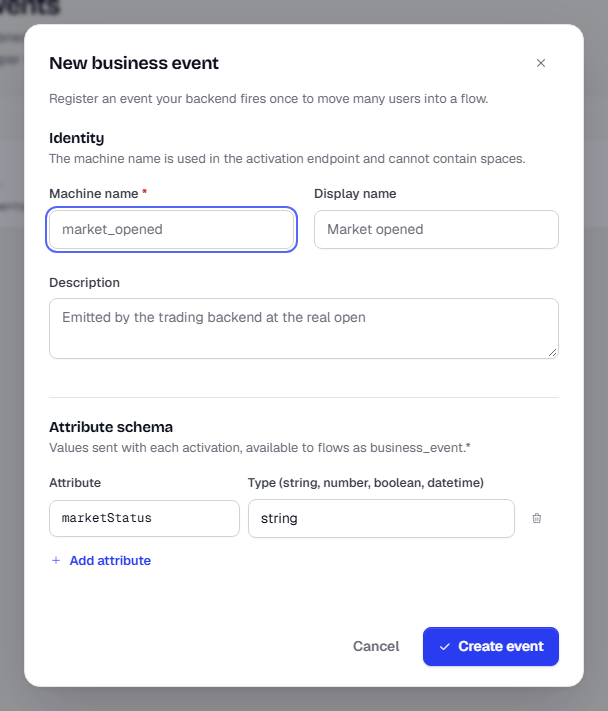
- Under Identity, enter a Machine name: lowercase letters, digits and underscores, starting with a letter, such as
flash_sale_started. It becomes part of the activation address and cannot contain spaces. - Enter a Display name and a Description.
- Under Attribute schema, select Add attribute for each value you send with an activation. Enter its name and a type:
string,number,booleanordatetime. - Select Create event.
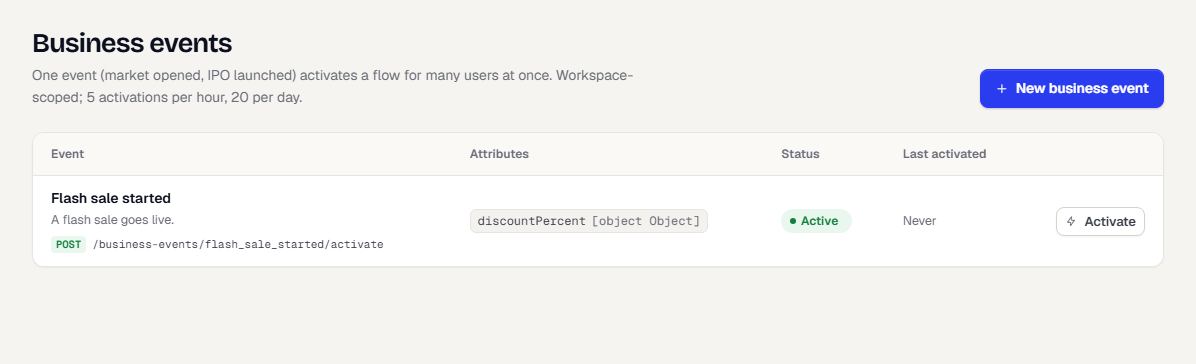
The list shows each event with its address, attributes, status and when it was last activated.
Bind a flow to the event
A flow is bound to an event through its entry.
- Create or open a flow and select the Entry tab.
- Set Entry type to Business event.
- Under Business event, pick the event.
The attributes appear as Available as business_event.*. See Set the entry. Every message in a run can use them as {{business_event.ipoName}}; the values are frozen from the activation, so all recipients see the same ones. A missing attribute fails that send unless the placeholder has a fallback, for example {{business_event.ipoName | default:"the IPO"}}. Publish the flow so it can admit people. See Save and publish a flow.
Activate the event
From the console
- On the Business events page, select Activate on the event's row.
- Edit the attribute values in the box. They are pre-filled from the schema.
- Select Activate now.
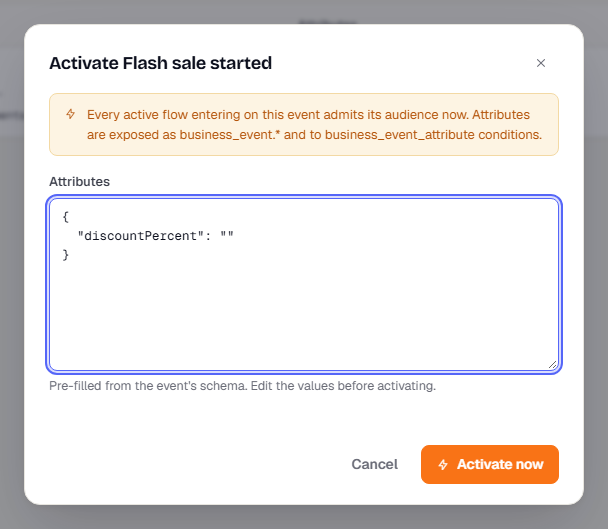
The dialog warns that every active flow entering on this event admits its audience now. In Test, messages are still held by the send gate and the Test allowlist.
From your backend
Send a request with a server key. The request body carries the attributes.
curl -X POST https://api.true-engage.com/v1/business-events/flash_sale_started/activate \
  -u "test_xxxxxxxx:YOUR_SECRET" \
  -H "Content-Type: application/json" \
  -d '{ "attributes": { "discountPercent": 30 } }'
For the full request, response and errors, see Activate a business event. To admit a single person instead, see Enter a user into a flow.
What happens next
Each activation creates a run on every bound flow. Open the flow and check Runs to see the audience size, how many entered and why people were skipped. See Monitor a flow.
Was this page helpful?