Troubleshoot ad platforms
Find out why conversions are skipped or missing, audiences stay empty, or connections fail, and check the limits that apply.
Start with the symptom you see. Each fix names the page or control to use. For codes, see Ad platform error codes.
Read the call log first
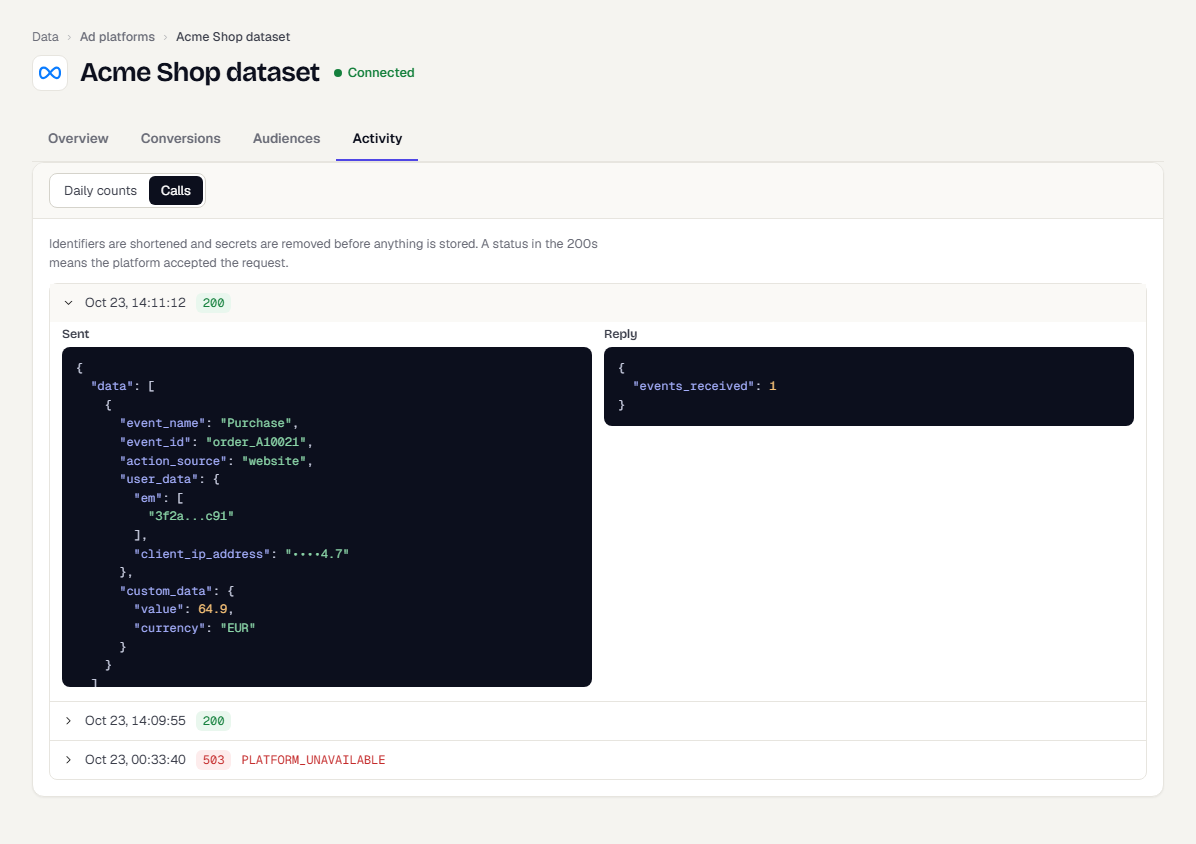
Open the connection, then Activity, then Calls. Each row is one request TrueEngage sent, with the time, the status code and any error code. Select a row to see Sent and Reply side by side. Identifiers are shortened and secrets are removed. Rows are kept for 7 days.
Conversions
Nothing is sent
You will usually find one of these:
- The mapping is paused, or its connection needs a reconnect. Check the status on Conversions.
- The event has no known user. Events with no user, and events from CSV imports, are never sent.
- The mapping's conditions are false. Check Only when on the Event tab.
- The event is too old. See the limits below.
Many events are skipped
Open Activity, Daily counts, and read Why events were skipped.
- The user has not agreed to share data with ad platforms: set
ads_consent. See Ad consent. - Nothing to match the user on: the user has no email, phone, click id or app id. Collect more identifiers. For GA4, check the Firebase app ID and the
ga_client_id. See Send events to Google Analytics 4. - The event came from an app that has not been verified yet: verify the app on Apps.
A test event does not show in the platform
- Check the connection is in test mode with the right test event code. Meta only shows test events on the Test events tab for that code.
- Check Calls for the request and the reply. A reply with
events_receivedof 1 means Meta accepted it. - For Google Ads and GA4, tests are validate-only and record nothing by design.
Meta counts the conversion twice
The browser event and the server event must share the event name and event ID. See Avoid duplicate events with your browser pixel.
Event match quality is low
Meta scores how well it can match events to people. Raise it by sending more identifiers per event: email, phone, fbc, fbp, IP address and user agent. The readiness bar in the mapping drawer shows the share of recent events that have a matchable value.
A click id is not used
Click ids expire for sending: 90 days for gclid, gbraid and wbraid, and 7 days for fbc. After that the event is still counted in TrueEngage but the platform cannot match it to the click. Check Sendable until on the user's Tracking tab.
Audiences
The audience is stuck on Processing
The platform is filling the list. Google Ads can take 6 to 48 hours. Meta usually takes under 1 hour. No action is needed. The row shows how long to expect.
The audience says Too small
Fewer people matched than the platform's minimum: 1,000 on Google Ads and 100 on Meta. The platform serves no ads to it yet. Add match keys, widen the segment, or wait.
The matched share is low
The platform matches only people it knows by that email or phone. Add a second identifier, such as Phone number alongside Email.
The Sync to ads button is missing
You need Create and manage on Ad platforms and View on Segments. A connection made with a token or secret, and GA4, Snap Ads and X Ads, cannot take audiences. A connection that needs a reconnect is not listed.
Nobody is sent
The Who would be sent panel shows zero when nobody in the segment has consented. Check the counts for no consent and nothing to match on.
Connections
The check fails after connecting
Read the message under the failed check, then see Ad platform error codes. The most common are an expired token, unaccepted Meta terms and a Google account that is not eligible.
Reconnect refuses my sign-in
This applies to connections made earlier with a sign-in. You signed in with a user that cannot reach the connected account. Sign in with a user that can. If you need a different account, remove the connection and connect the other account.
The sign-in window does not open
Your browser blocked it. Select Sign in in this window. You return to TrueEngage afterwards to choose an account.
Tracking
The Tracking tab is empty
A touch is recorded only when a link or install carries campaign values or a click id. Check the landing URL has utm_* or a click id. Check the SDK is version 0.7.0 or later, and that tracking is not opted out. For installs through a smart link, check Smart links and ad conversions.
First touch changed after an import
First touch keeps the earliest captured_at. An import with an earlier date replaces it. See Import past ad tracking data.
Limits
| Limit | Value |
|---|---|
| Maximum event age | Meta 7 days, GA4 70 hours, Google Ads 29 days, Snap Ads 28 days, X Ads 90 days |
| Future dated events | Not queued when more than 1 hour ahead |
| Retry schedule | 1 minute, 5 minutes, 30 minutes, 2 hours, 6 hours, then every 6 hours |
| Click id sendable window | gclid, gbraid, wbraid 90 days. fbc 7 days |
| Audience minimum | Google Ads 1,000, Meta 100 |
| Audience fill time | Google Ads 6 to 48 hours, Meta up to 1 hour |
| Health check | Every 6 hours |
| Audience full resync | Weekly, Sunday around 03:00 in your workspace time zone |
| Call log kept | 7 days |
| Delivery history kept | 30 days |
| Sign-in to account pick | 15 minutes |
| Revealed identifier | Masks again after 2 minutes |
Was this page helpful?