Link domains
Claim a shared name or add your own subdomain, publish the DNS records, check the certificate and set the domain's defaults.
A link domain is the host name your smart links live on, such as go.acmeshop.example. TrueEngage answers every request to it, serves the files that let iOS and Android open your app, and keeps its HTTPS certificate current.
Each Test or Live environment has its own domains.
Before you start
- You need Create and manage permission on Smart Links.
- For your own domain, you need to edit its DNS records.
Claim a domain
- Open Smart Links, then Domains.
- Select Claim a domain.
- Choose the type:
- Shared name is a free name under TrueEngage's link domain. Enter a Subdomain: 3 to 32 lowercase letters, numbers or hyphens, starting and ending with a letter or number. It cannot end in
-alt, and some names are reserved. The dialog checks availability as you type. - Your own domain is a subdomain you control. Enter the Hostname, such as
go.yourbrand.com. It needs at least three parts. An apex domain such asyourbrand.comcannot be used, because it cannot have a CNAME. IP addresses and domains that belong to the platform are refused.
- Shared name is a free name under TrueEngage's link domain. Enter a Subdomain: 3 to 32 lowercase letters, numbers or hyphens, starting and ending with a letter or number. It cannot end in
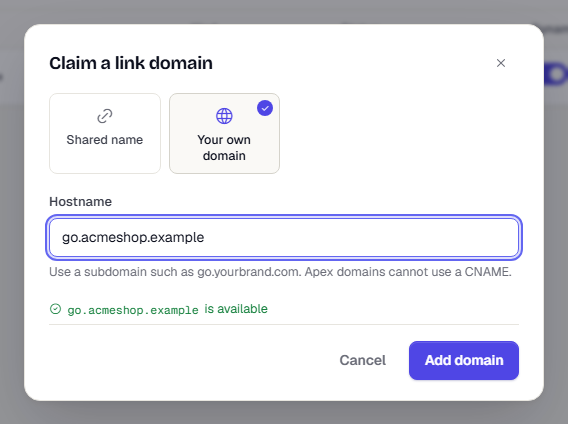
- Select Claim domain (shared) or Add domain (your own).
A shared name is active straight away. An own domain starts as Pending DNS.
If you removed a hostname earlier in this environment, you can add it again. Verification starts from scratch.
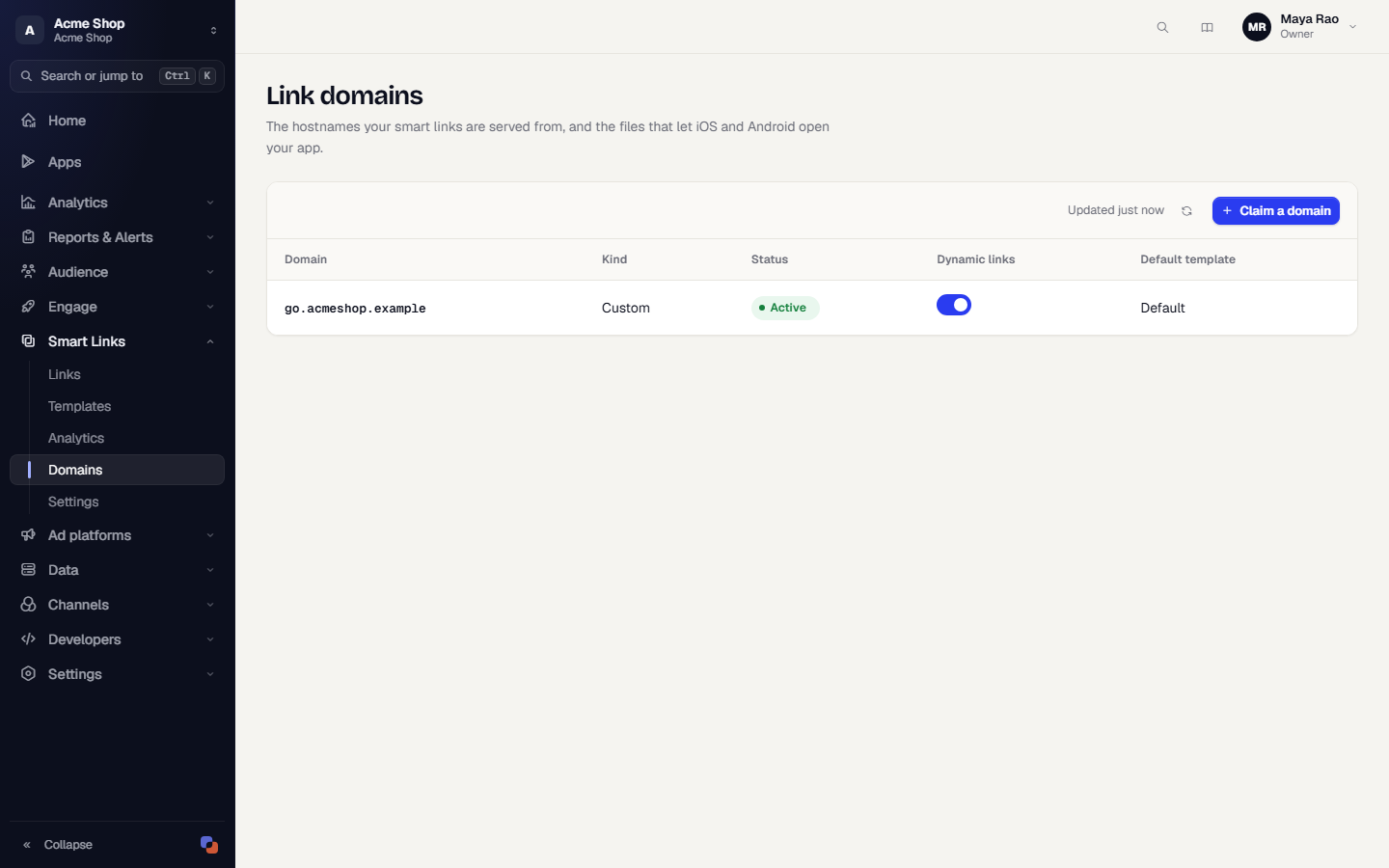
Set up your own domain
Open the domain from the list. Under Overview, the Custom domain setup card lists the records to publish at your DNS host.
| Record | Purpose |
|---|---|
TXT at _te-verify.<your host> |
Proves the domain is yours. |
CNAME at <your host> |
Sends traffic to TrueEngage. |
Each record has a Copy button and shows Found or Missing.
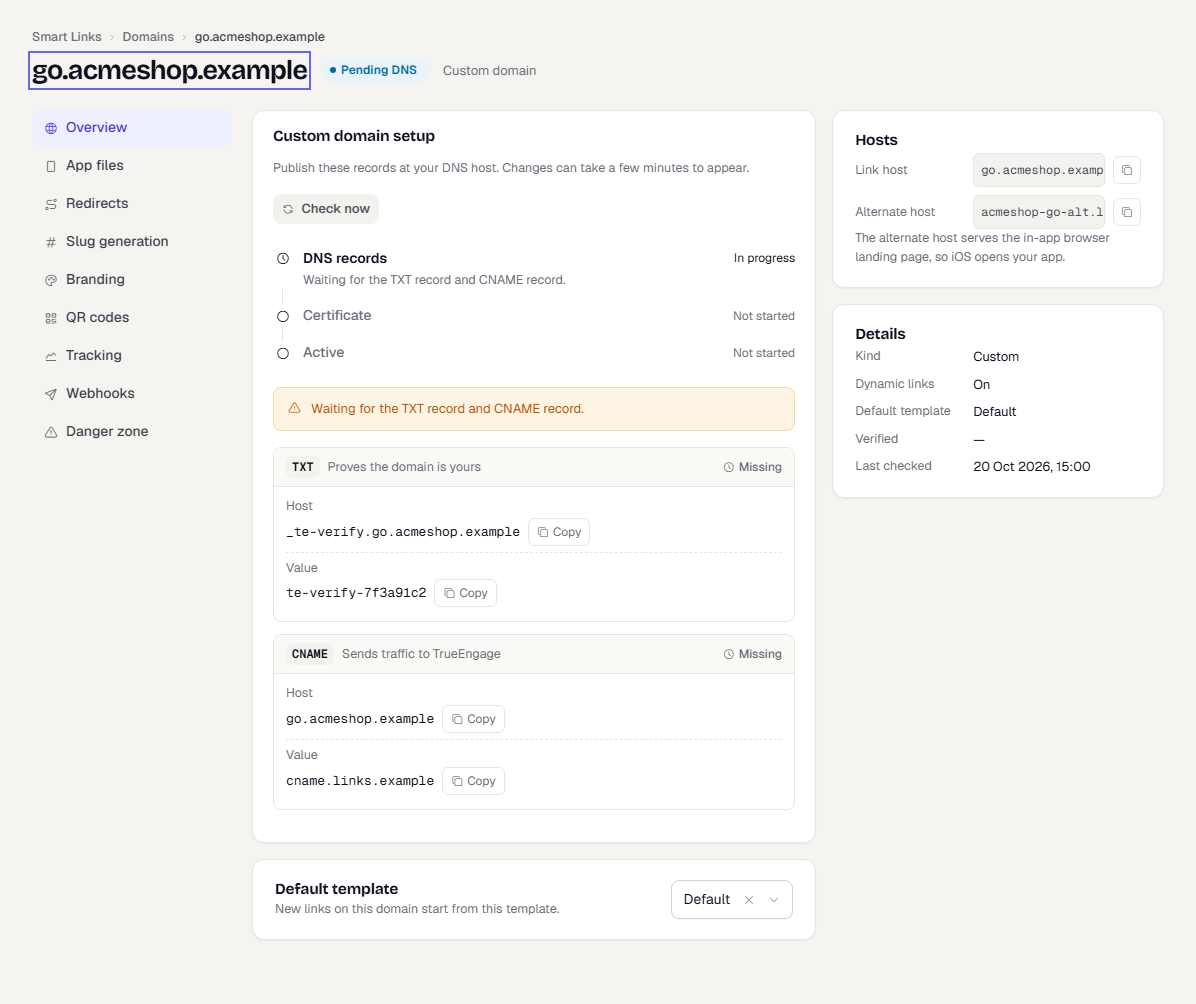
TrueEngage checks the records every few minutes. Select Check now after you publish them. Changes at your DNS host can take a few minutes to appear.
The setup progress has three steps:
| Step | Meaning |
|---|---|
| DNS records | Waiting for the TXT and CNAME records. |
| Certificate | DNS is correct. TrueEngage is getting an HTTPS certificate. No action needed. Keep the records in place. This takes a few minutes. |
| Active | The domain serves links. |
Domain statuses
| Status | What it means | What to do |
|---|---|---|
| Pending DNS | A record is missing or wrong. | Publish the records. A line under the step names the one that is missing. |
| Pending cert | Certificate in progress. | Wait. |
| Active | Serving links. | Nothing. |
| DNS error | A record that worked has gone, or never matched. | Restore the record. A domain that lost its CNAME keeps serving for a while, then stops. |
| Cert error | The certificate could not be issued. | Read the message on the card, fix the cause and select Check now. |
| Suspended | An Owner suspended it. Links on it do not open. | An Owner selects Unsuspend domain. |
| Removed | You removed it. | Add it again if you need it. |
If your DNS host is a proxy that rewrites the CNAME, turn the proxy off for this record. TrueEngage must see the CNAME itself.
What a domain holds
The domain page has a section menu. The section is kept in the address (?section=).
| Section | What you do there |
|---|---|
| Overview | See the hosts and status. Pick the Default template that new links start from. Turn Dynamic links on or off from the list. |
| App files | See the association files and run Check association. Copy the setup steps for your app. See Deep links and deferred deep links. |
| Redirects | Set where / and unknown links go. |
| Slug generation | Set how long generated short ids are and whether they are case-sensitive. |
| Branding | Style the not-found and expired pages. |
| QR codes | Set the default QR style. See QR codes. |
| Tracking | Web conversions and pixels. |
| Webhooks | Send click, install and open events to your server. See Links API and webhooks. |
| Danger zone | Remove a custom domain, or suspend a domain (Owners only). |
The two hosts
Every domain has a Link host and an Alternate host. The alternate host serves the landing page shown inside in-app browsers. iOS opens an app only when a link is followed from a different host, so the Open in app button points to the alternate host. Add both hosts to your app. See Deep links and deferred deep links.
Dynamic links
With Dynamic links on, any path on the domain that is not a saved short id works as a link. https://go.acmeshop.example/product/123?pid=Email&c=autumn opens your app with the deep link value /product/123. It uses the domain's Default template, or the template named in ?tpl=. Use this for links your server builds. Turn it off to make unknown paths show the not-found page.
A request is answered in this order: files under /.well-known/ and /_te/, then a saved short id, then a dynamic link, then the not-found page.
Redirects
| Field | Where it sends people |
|---|---|
| Root redirect | Visitors to the bare domain, /. |
| Page not found redirect | Visitors to a link that does not exist. The click is still recorded as not found. |
Both are 302 redirects to an https address on your redirect allowlist. Leave a field empty to show TrueEngage's plain page instead. Special paths such as /.well-known/ never redirect.
Slug generation and case
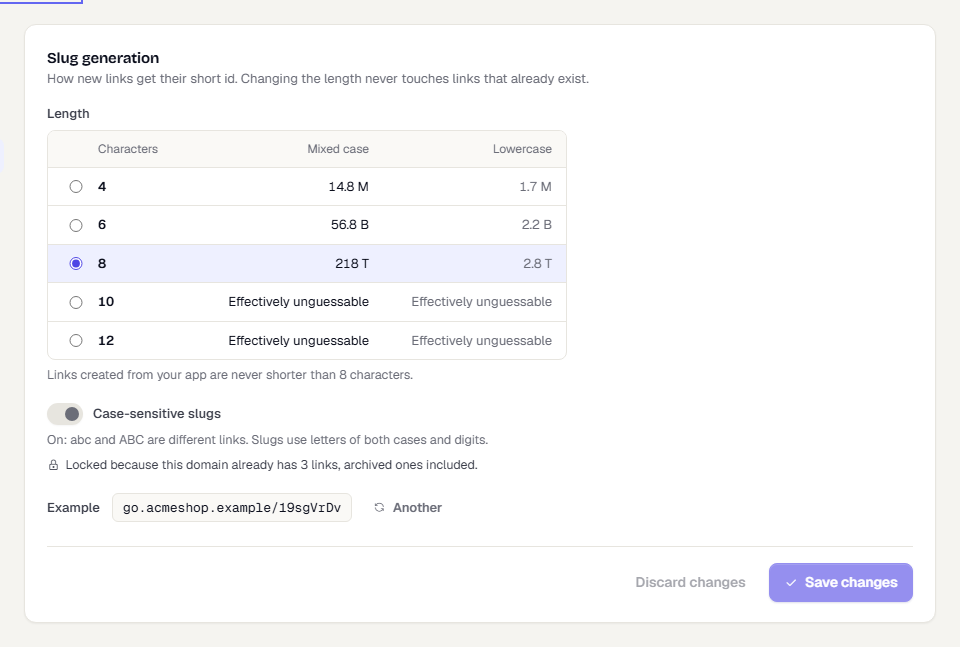
New links without a short id get a random one. Choose its length under Slug generation.
| Characters | Mixed case | Lowercase |
|---|---|---|
| 4 | 14.8 million | 1.7 million |
| 6 | 56.8 billion | 2.2 billion |
| 8 | 218 trillion | 2.8 trillion |
| 10 or 12 | Too many to guess | Too many to guess |
Changing the length never touches existing links. A warning appears when the domain uses over 1 percent of its space. Links created from your app are never shorter than 8 characters.
Case-sensitive slugs decides whether abc and ABC are different links.
- On: slugs use letters of both cases and digits.
- Off: both open the same link. Short ids are stored in lowercase, which is safer to type and share.
The setting locks as soon as the domain has any link, archived ones included. Decide before you create links.
Branding
Branding styles the page a visitor sees when a link is not found or has expired and no redirect is set: a Logo from your asset library, an Accent colour, and a Page not found message and Expired link message up to 140 characters each.
Tracking
- Web conversions. When a visitor is sent to your verified web app,
te_clidis added to the address. The TrueEngage web SDK on that site reads it, credits the visit to the link, and removes it. This is always on. Add te_clid to every web address extends it to other addresses. Turn it on only when those sites run the web SDK. - Pixels. Enter your GA4, GTM or Meta ids. A link that opts in under Advanced > Fire tracking pixels shows a brief page that loads the tags, then continues. This adds 300 to 800 ms. Your workspace is responsible for visitor consent.
Remove or suspend
- Remove domain (custom domains only) stops serving links from the host and deletes its certificate. The name stays reserved for this environment. A suspended domain must be unsuspended first.
- Suspend domain (Owners only) stops every link on the domain. Use it to stop abuse quickly.
Troubleshooting
| Problem | Check |
|---|---|
| The status stays Pending DNS | The records must be at the exact host names shown. Some DNS tools add your domain automatically, so enter only the part before it. Use Check now after a few minutes. |
| Cert error | Read the message on the card. Common causes are a CAA record that blocks certificate issuance, or a proxy in front of the host that hides the CNAME. |
| Links open in the browser, not the app | Run Check association on App files. See Troubleshooting and limits. |
| A short id is refused | Ids are 3 to 40 letters, digits, - or _, and unique per domain. |
| A link shows the not-found page | The short id is wrong, the link is archived, or the domain has Dynamic links off and the path is not a saved link. |
Related pages
Was this page helpful?