Preview a template with a real profile
Render the saved version with a real profile and an optional synthetic event before you send.
The Live preview beside the editor shows the layout. It fills variables from your Synthetic event and uses placeholder text for the rest. Rendered preview goes further: the server renders the saved version with a real profile's data, so you see the exact text a person would receive.
Before you start
Save the template first. The rendered preview uses the saved version, not unsaved edits.
Steps
Open the template and scroll to the tabs below the content. Select Rendered preview.
In Personalise with profile id, enter a profile id or external id. In the demo workspace use
u-1001.Optional: in Synthetic event, enter JSON such as
{"eventName": "Order Placed", "properties": {"orderId": "AS-10482"}}, or just the values, such as{"orderId": "AS-10482"}. The properties supply theevent.*andcampaign.*variables. The same box is used by test sends.Select Render preview.
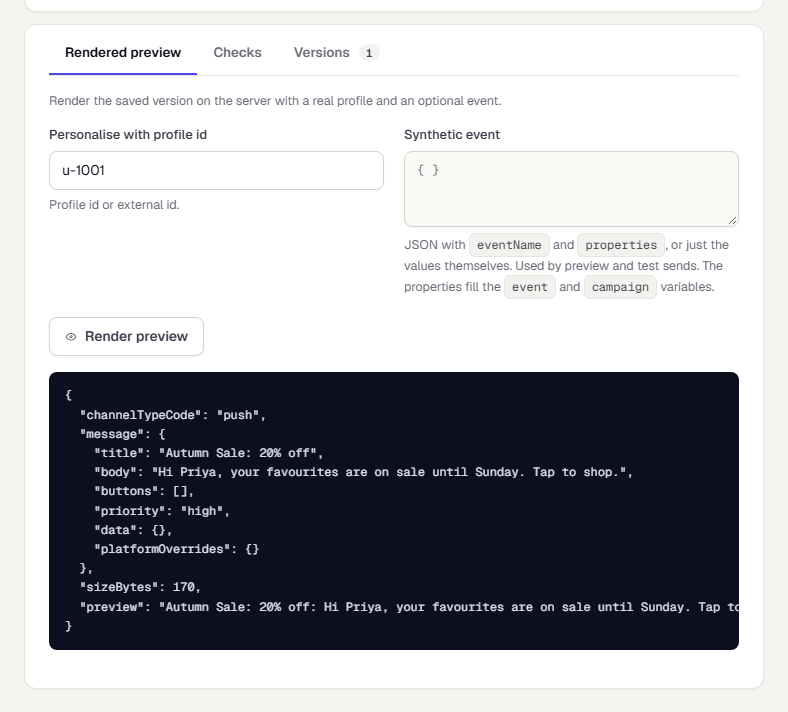
For email the result shows the Subject and the rendered HTML. For push the result shows the rendered title and body (here Hi Priya, ...), the payload size and a one-line preview.
Read the result
If the preview had to use placeholder values, a note says Placeholder values were used for and names them. Fill the Synthetic event to see real output.
If a variable has no value and no fallback, a Missing variables warning lists it. Add a fallback with | default: "..." or choose a profile that has the value. See Personalise a template.
Related
Was this page helpful?