Links API and webhooks
Create links from inside your app with the SDK, and receive click, install and open events on your own server.
There are two ways to connect smart links to your own code:
- Create links from your app with the SDK, for sharing, invites and referrals.
- Receive events on your server with webhooks.
What is not available
There is no server-key endpoint to create, read or change links. Links are managed in the console, or in bulk with a CSV file. See Create your first link and Templates and bulk creation. Links your server builds per person can be made with no API call at all: use a dynamic link, optionally signed. See Link domains and Link settings.
Create a link from your app
Use this when a person shares something from inside the app, such as a product, a group invite or a referral, and you want a short link that opens it. Each link is attributable, so you can see who opened it and, if you allow it, who shared it.
Before you start
- SDK 0.5.0 or later.
- In Smart Links > Settings > App-created links, turn on Allow your app to create links and choose a Template. See Link settings. Until then the call fails with
disabled.
Android
TrueEngage.createLink(
    TELinkOptions(
        deepLinkValue = "/product/123",
        params = mapOf("referCode" to "ABC123"),
        channel = "invite",
        campaign = "autumn_referral",
    ),
) { result ->
    when (result) {
        is TELinkResult.Success -> share(result.link.url)
        is TELinkResult.Failure -> showError(result.error) // DISABLED, RATE_LIMITED, INVALID or NETWORK
    }
}
iOS
TrueEngage.createLink(TELinkOptions(
    deepLinkValue: "/product/123",
    params: ["referCode": "ABC123"],
    channel: "invite",
    campaign: "autumn_referral"
)) { result in
    switch result {
    case .success(let link): share(link.url)
    case .failure(let error): showError(error) // .disabled, .rateLimited, .invalid, .network
    }
}
Flutter
try {
  final link = await TrueEngage.createLink(
    deepLinkValue: '/product/123',
    params: {'referCode': 'ABC123'},
    channel: 'invite',
    campaign: 'autumn_referral',
  );
  share(link.url);
} on TrueEngageLinkException catch (e) {
  // e.error: disabled, rateLimited, invalid or network
}
Web
try {
  const link = await TrueEngage.createLink({
    deepLinkValue: '/product/123',
    params: { referCode: 'ABC123' },
    channel: 'invite',
    campaign: 'autumn_referral',
  });
  share(link.url);
} catch (e) {
  // e.code: disabled, rate_limited, invalid or network
}
What you can send
| Field | Rules |
|---|---|
deepLinkValue |
Required. Up to 512 characters. A path starting with /, or an https address on your redirect allowlist. |
params |
Optional. Up to 10 entries. Keys up to 40 characters of letters, digits, ., _ or -. Values up to 256 characters. Reserved attribution keys and keys starting te_ are refused. |
channel |
Optional. Up to 40 characters. Defaults to user_share. Saved as the media source. |
campaign |
Optional. Up to 100 characters. |
The result has url, shortId, linkId and expiresAt (empty when the link does not expire).
- The same input from the same person returns the same link, so a retry is safe.
- The short id is random and at least 8 characters long. The domain, routing and appearance come from the template you chose in settings.
- The SDK never throws. Failures come back as a typed error. Nothing is queued or retried by the SDK.
- With tracking opted out, the call returns
disabledwithout a network request. - The daily limit per person (default 50) returns
rate_limited.
When someone opens the link, your app receives it in onDeepLink with params and a referrer holding linkId. referrer.creatorUserId is filled only if you turned on Share the sharer's user id in settings. See Deep links and deferred deep links.
HTTP details
The SDK calls POST /sdk/links/create with the SDK app key in X-TE-App-Key and the scope sdk.track. Prefer the SDK, which fills the required context for you. The endpoint returns its payload without the usual envelope. See SDK ingest for the app key and the context object.
| Status | Code | Meaning |
|---|---|---|
| 200 | Created, or the same link returned again. | |
| 400 | The body has a field the endpoint does not know, or context is incomplete. |
|
| 403 | LINK_SDK_DISABLED |
Link creation is off or no template is chosen. |
| 422 | LINK_SDK_INVALID |
The request is not valid, for example a reserved key. |
| 422 | LINK_SDK_URL_NOT_ALLOWED |
The address is not on the redirect allowlist. |
| 429 | LINK_SDK_DAILY_CAP |
This person reached the daily limit. |
| 429 | A rate limit was hit. Slow down. |
The other two endpoints in /sdk/links (resolve and deferred) are called by the SDK when the app opens from a link. You do not call them yourself.
Webhooks
A webhook sends click, install and open events to an address you choose, as they happen.
Add a webhook
- Open Smart Links > Domains and choose a domain.
- Open Webhooks, then select Add webhook.
- Enter the Endpoint URL. It must be an
httpsaddress on a public host, port 443 or 8443. Private and internal addresses are refused. - Choose the Events: Clicks, Installs, Opens. All three are on by default. You can untick any of them.
- Choose Applies to: This domain or Every domain.
- Select Add webhook.
- Copy the signing secret now. It is shown once.
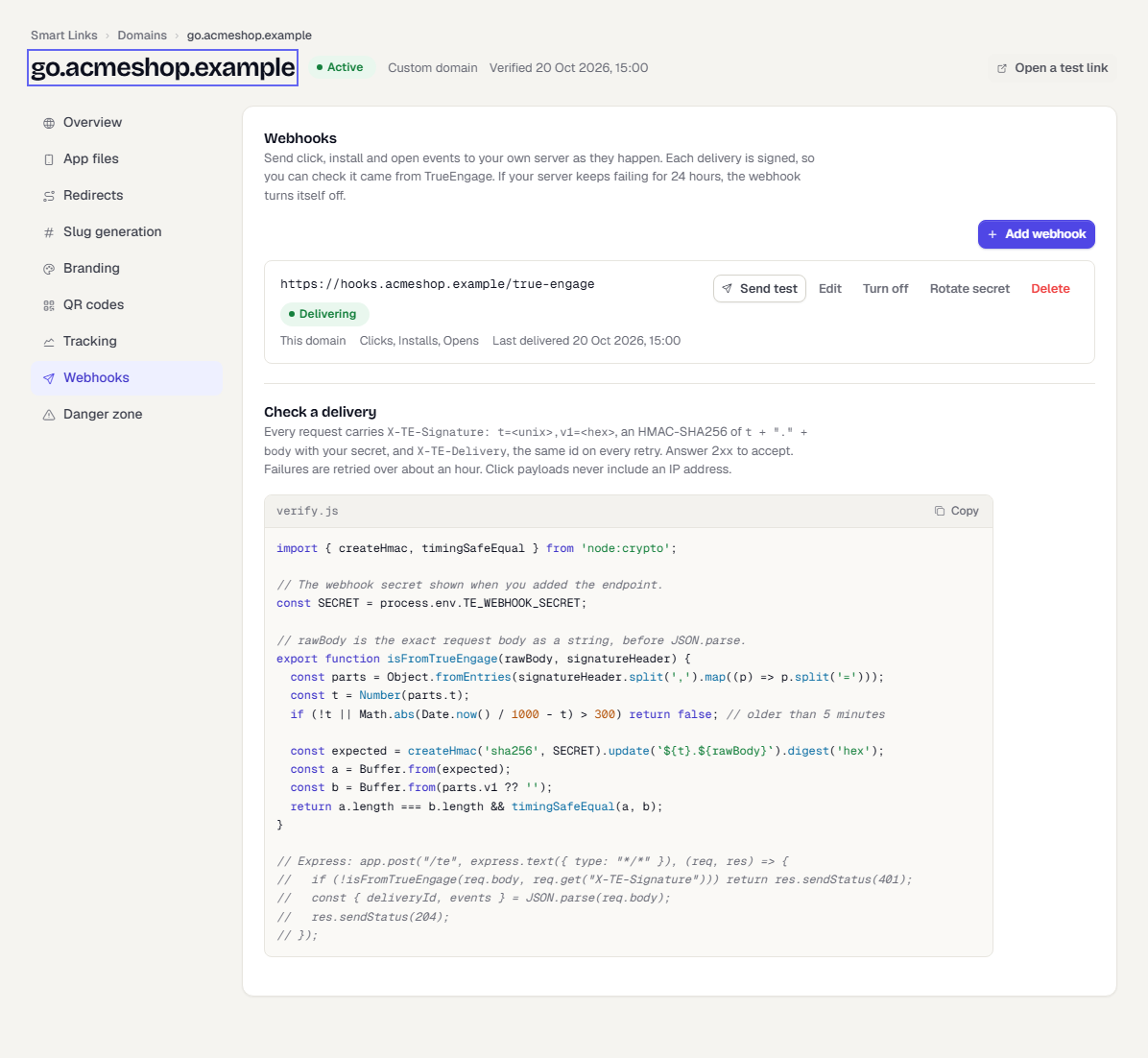
Each webhook has Send test, Edit, Turn off, Rotate secret and Delete. Send test posts a test event and shows what your server answered. After you rotate, the old secret stops signing at once.
What a delivery looks like
Each request is a POST with a JSON body:
{
  "deliveryId": "0192f3c4-7b1e-7a55-8f0d-2c1b9a3d5e10",
  "events": [
    {
      "type": "click",
      "clickId": "0192f3c4-7b1e-7a55-8f0d-2c1b9a3d5e11",
      "occurredAt": "2026-10-20T09:30:12.000Z",
      "linkId": "0192f3b8-0000-7000-8000-000000000f01",
      "shortId": "autumn24",
      "url": "https://go.acmeshop.example/autumn24",
      "platform": "ios",
      "osVersion": "18.6",
      "country": "IN",
      "outcome": "store",
      "via": "qr",
      "isBot": false,
      "mediaSource": "Push",
      "campaign": "autumn_sale",
      "referrerHost": null
    }
  ]
}
A request carries up to 100 events. Click events never include an IP address.
Install and open events have type set to install or open and these fields instead of the platform ones: attributionId, clickId, occurredAt, linkId, shortId, url, matchType, isDeferred, isRetargeting, deepLinkValue, mediaSource and campaign. Click events include bots and link previews, marked isBot.
Headers:
| Header | Meaning |
|---|---|
X-TE-Signature |
t=<unix seconds>,v1=<hex>. The hex value is an HMAC-SHA256 of <t>.<raw body> with your secret. |
X-TE-Delivery |
The same id as deliveryId. It is the same on every retry, so you can drop duplicates. |
Check the signature
Verify the raw body before you parse it, and reject an old timestamp so a captured request cannot be replayed.
import { createHmac, timingSafeEqual } from 'node:crypto';

const SECRET = process.env.TE_WEBHOOK_SECRET;

export function isFromTrueEngage(rawBody, signatureHeader) {
  const parts = Object.fromEntries(signatureHeader.split(',').map((p) => p.split('=')));
  const t = Number(parts.t);
  if (!t || Math.abs(Date.now() / 1000 - t) > 300) return false;

  const expected = createHmac('sha256', SECRET).update(`${t}.${rawBody}`).digest('hex');
  const a = Buffer.from(expected);
  const b = Buffer.from(parts.v1 ?? '');
  return a.length === b.length && timingSafeEqual(a, b);
}
Delivery and retries
- Answer with a 2xx status to accept a delivery. Redirects are not followed.
- A failed delivery is retried over about an hour.
- If your server fails continuously for 24 hours, the webhook turns itself off and you are alerted. Fix the server and select Turn on.
- The status of each webhook shows Delivering, Failing, Off or No deliveries yet, with the last answer and error.
Related pages
Was this page helpful?