Ad platforms
Send conversions to Google Ads, Meta, Google Analytics 4, Snap Ads and X Ads, sync audiences, and keep the ad click behind every user.
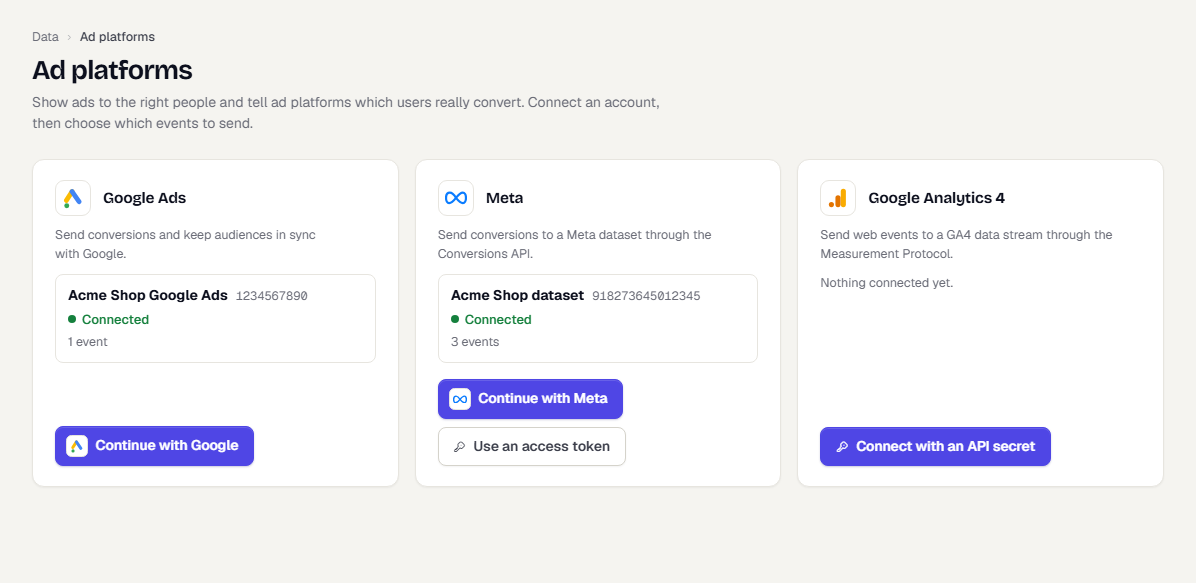
Ad platforms connects TrueEngage to Google Ads, Meta, Google Analytics 4 (GA4), Snap Ads and X Ads. TrueEngage records which ad brought each person, sends the events you choose to the platforms as conversions, and keeps segments in sync as ad audiences. Everything is consent gated, hashed and logged.
What you can do
- Capture where users came from. SDKs, smart links, your server and CSV imports record UTM values and ad click ids on the profile. See Tracking attributes.
- Send conversions. Pick an event, such as a purchase, and where it goes. TrueEngage sends it from its servers, so ad blockers and browser limits do not hide it. See Send events as conversions.
- Sync audiences. Send a segment to Google Ads or Meta as a customer list, then target it or exclude it in your ads. See Sync segments to ad audiences.
- Add or remove people in a flow. Use the Ad audience step. See Add people to ad audiences from a flow.
Supported platforms
| Platform | Conversions | Audiences | How you connect |
|---|---|---|---|
| Google Ads | Yes | Yes, as Customer Match lists | Your own OAuth client, developer token and refresh token, with a customer ID. See Connect Google Ads |
| Meta | Yes, through the Conversions API | Yes, as custom audiences | Dataset ID and access token. Connections made earlier with Meta sign-in keep working. See Connect Meta |
| Google Analytics 4 | Yes, through the Measurement Protocol | No | Measurement ID and API secret. See Google Analytics 4 |
| Snap Ads | Yes, through the Conversions API | No | Ad account ID, OAuth app client ID and secret, and a refresh token. See Connect Snap Ads |
| X Ads | Yes, through the Conversions API | No | Ads account ID, API key and secret, and an access token and secret. See Connect X Ads |
TikTok, LinkedIn and other platforms are not supported.
How data flows
- A person arrives from an ad. The SDK, smart link or your server records the touch on their profile.
- The person does something you mapped, such as placing an order. TrueEngage stores the event and queues a delivery.
- About a minute later, TrueEngage builds the platform request. It adds hashed email or phone, the click id and the event ID, then sends it.
- If the platform is down, TrueEngage retries. If the event gets too old for the platform, it is marked Expired.
Nothing in this path slows down event ingestion. Sending happens in the background.
Consent comes first
TrueEngage sends a person's data to an ad platform only when you have recorded that they agreed. By default, that means the user attribute ads_consent is true. Without it, the event is skipped and the person is left out of audiences. See Ad consent.
Before you start
- Open Data, then Ad platforms in the sidebar.
- You need the Ad platforms permission. View shows connections and activity. Create and manage changes them.
- Sending audiences also needs View on Segments.
- Each environment has its own connections, mappings and audiences. Nothing is copied between Test and Live.
Set up in five steps
- Connect an account. Start with Meta or Google Ads.
- Set
ads_consentfor your users. See Ad consent. - Choose the events to send. See Send events as conversions.
- Send a test and check the platform received it.
- Sync a segment, if you want audiences.
What TrueEngage does not do
- It never sends a person who has not agreed, unless your consent mode says everyone has.
- It never sends raw email or phone. Identifiers are hashed with SHA-256 first.
- It does not fingerprint devices. On iOS, the advertising ID is used only after the user allows tracking.
- It has no people-level list or export. The console shows counts, and masked values on a single profile.
Related pages
Was this page helpful?