Sync segments to ad audiences
Send a segment to Google Ads or Meta as a customer list, keep it up to date, and understand each status.
An audience sync sends the members of a segment to Google Ads or Meta as a customer list. You can then target the list in ads, or exclude it. TrueEngage keeps the list current as the segment changes.
Before you start
- You need Create and manage on Ad platforms and View on Segments.
- Connect Google Ads with your own credentials. Meta connections made earlier with Meta sign-in also sync audiences; new Meta connections use an access token and send conversions only. API secrets and GA4 connections send conversions only. See Connect Google Ads.
- The connection must be active. A connection that needs a reconnect pauses its audiences.
- Record ad consent. Only people who agreed are sent. See Ad consent.
Platform limits
| Google Ads | Meta | |
|---|---|---|
| Match on | Email, phone | Email, phone, device advertising ID |
| Minimum matched people before ads can use the list | 1,000 | 100 |
| Time for a list to fill | 6 to 48 hours | Up to 1 hour |
The numbers also appear in the sync drawer. The platform decides how many people it matches, so the matched share is usually below the number you send.
Sync a segment
- Open the segment and select Sync to ads. Or open the connection, then the Audiences tab, and select Sync a segment.
- Under Where to send, choose the Segment (if you did not start from one) and the Ad account.
- Edit the Audience name. It is the name people see in the ad platform.
- Under Match on, tick the identifiers to send. Each shows the share of consenting members that have it.
- Under How often, choose Update the audience:
- Every time the segment refreshes
- Once a day
- Only when I start it
- Read Who would be sent: users who will be sent, users with no consent and users with nothing to match on.
- Select Start syncing.
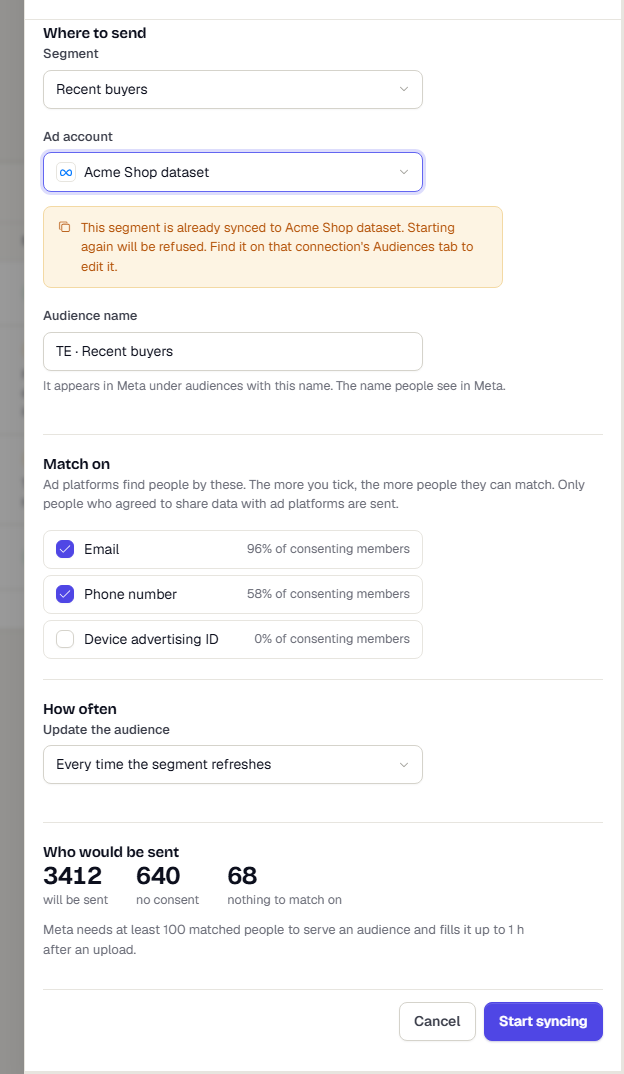
Each segment can sync once to each ad account. TrueEngage creates the audience on the platform the first time it runs.
Read the audiences list
The Audiences tab lists every audience on the connection with Members, Matched, Status and Last sync. Matched is the share of sent people the platform could match, when the platform reports it.
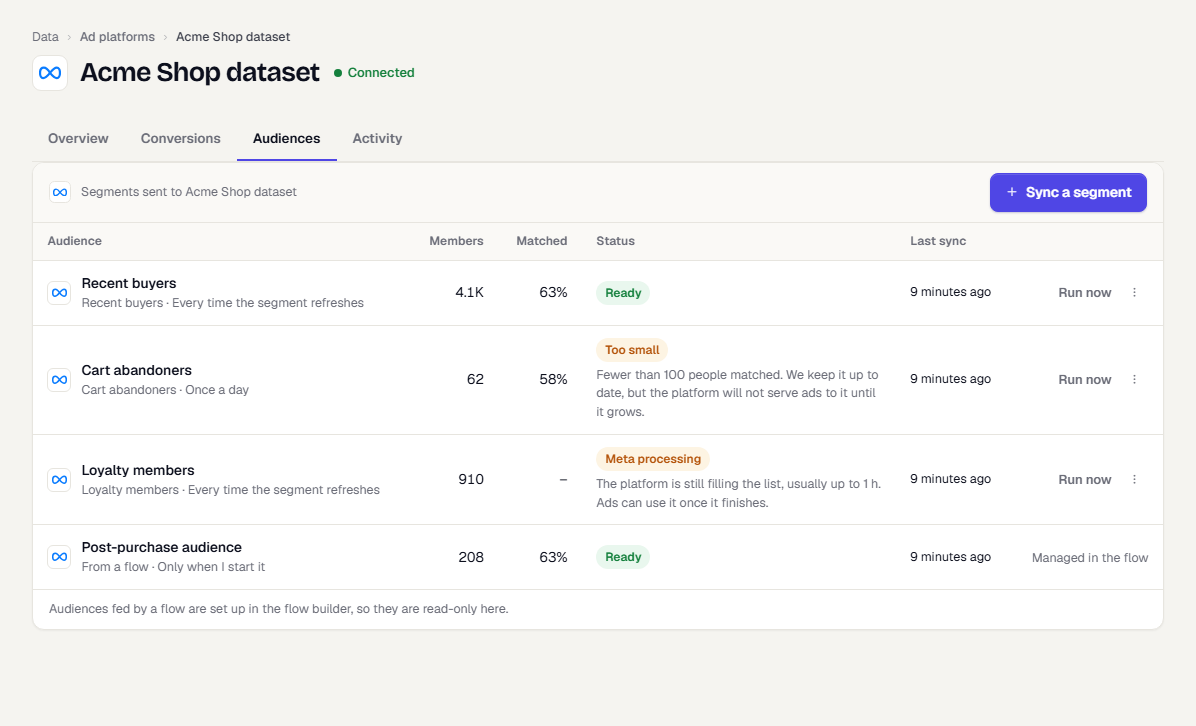
| Status | Meaning |
|---|---|
| Ready | The platform has the latest list |
| Syncing | TrueEngage is uploading changes |
| Processing | The platform is still filling the list, which can take hours on Google |
| Too small | Fewer people matched than the platform minimum. TrueEngage keeps updating it, but the platform serves no ads to it until it grows |
| Failed | The last run failed. The row shows the reason and what to do |
| Needs reconnect | The connection needs attention. See Fix connection errors and reconnect |
| Paused | Not updating |
| Removing | TrueEngage is taking people out of the platform list before deleting the row |
For error messages, see Ad platform error codes.
Run, pause, edit or delete
- Run now starts an update immediately.
- The three-dot menu has Edit, Pause or Resume, Full resync and Delete.
- Edit changes the name, identifiers and schedule. It does not rename a list that already exists on the platform.
- Full resync compares everything again, to correct drift. TrueEngage also runs one every Sunday around 03:00 in your workspace time zone.
Audiences fed by a flow show Managed in the flow and cannot be edited here.
Delete an audience
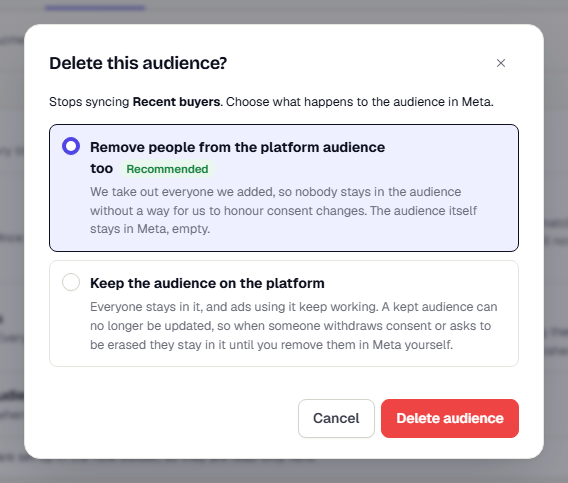
Delete asks what happens to the list on the platform:
- Remove people from the platform audience too (recommended): TrueEngage takes out everyone it added, then removes the row. The empty list stays on the platform.
- Keep the audience on the platform: everyone stays in it and ads keep working. TrueEngage can no longer update it. If someone withdraws consent later, they stay in the list until you remove them on the platform.
How a run works
- TrueEngage works out who is eligible: segment members who consented and have at least one chosen identifier.
- It compares them with who was sent before. New people are added. People who left the segment, withdrew consent or were deleted are removed.
- It hashes email and phone with SHA-256 and sends them in batches.
Only changes travel. A run that finds nothing new sends nothing.
People that could not be removed
When someone leaves a segment, withdraws consent, is deleted or is erased, TrueEngage asks the platform to remove them. If the platform never confirms, TrueEngage keeps trying for 14 days and then gives up. The audience row and its edit drawer then show a warning:
3 people could not be removed from this audience. We gave up because the ad account needed to be reconnected and the ad platform did not confirm in time. They may still be in it on the platform. Since 21 Oct 2026.
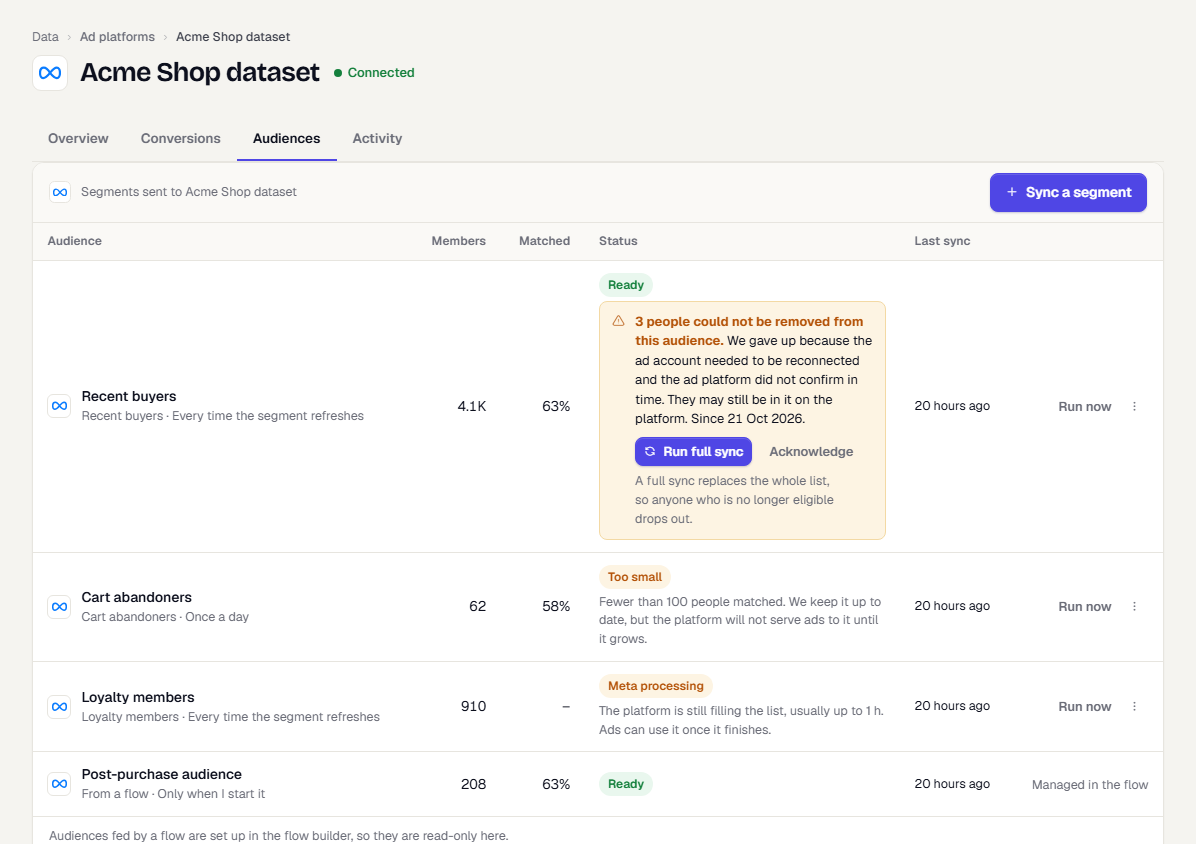
The causes, in the words the notice uses:
| Cause | What it means |
|---|---|
| The ad account connection was removed | The connection was deleted before the removal finished. |
| The audience was paused | The audience was not updating. |
| The ad account needed to be reconnected | The sign-in expired or was revoked. |
| The ad platform kept returning errors | The last runs failed. |
| The ad platform did not confirm in time | None of the above, and no answer within 14 days. |
You need Create and manage on Ad platforms to act on the notice. With View only it informs you. It also needs View on Segments for an audience that comes from a segment.
To fix it:
- Read the cause in the notice.
- Select the action it offers:
- Run full sync on a Meta segment audience. A full sync replaces the whole list, so anyone no longer eligible drops out.
- Reconnect when the connection needs it. See Fix connection errors and reconnect.
- With no button, remove the people in the ad platform yourself, or delete the audience there.
- Select Acknowledge once you have dealt with it. The warning goes away. It returns if more people are given up on later.
Each audience shows counts only, never names. A person who could not be removed because they were erased has no data left for TrueEngage to find them with, so remove them on the platform if you must.
What happens next
Was this page helpful?