Web SDK
Install the TrueEngage web SDK, track page views and events, identify users and set up web push.
Use the web SDK (@trueengage/web, version 1.0.0) to track events and users on your site and to send web push notifications. It is written in TypeScript, about 12 KB gzipped, and uses no cookies.
Before you start
- An app key for your site. Use a
test_key while you develop. See Test and Live keys. - Your site must run on https.
localhostis fine for development. - For web push: a Firebase project with Cloud Messaging, its Web Push public key (VAPID key), and the ability to serve a file from your site's root. See Set up web push.
Install
With npm:
npm i @trueengage/web
import TrueEngage from '@trueengage/web';

TrueEngage.initialize({
  appKey: 'test_xxxxxxxx',
  dataRegion: 'in',
});
initialize is synchronous and makes no network call. Call it once, as early as possible. Every other method is safe to call before it, and none of them throws into your page.
Configuration
Pass these fields to initialize. Only appKey is required.
| Field | Type | Default | Meaning |
|---|---|---|---|
appKey |
string | none | test_… or live_…. Selects the environment. |
apiHost |
string | region host | Full base URL. Overrides dataRegion. Must be https (or localhost). |
dataRegion |
'in' |
'in' |
Picks the API host. India is the only data region today. |
logLevel |
'none' | 'error' | 'warn' | 'info' | 'verbose' |
'error' |
Console logging. |
optOutByDefault |
boolean | false |
Collect nothing until optIn(). For consent-managed sites. |
flushIntervalSeconds |
number | 30 |
Seconds between timed flushes. |
flushBatchSize |
number | 50 |
Flush when this many items wait. |
maxQueueSize |
number | 10000 |
Items kept before the oldest are dropped. |
sessionTimeoutMinutes |
number | 30 |
Idle time that ends a session. |
pageTracking |
boolean | true |
Send Page Viewed on load and on history changes. |
flushOnOptOut |
boolean | true |
On opt-out, send what is queued first. false deletes it. |
push.autoRegister |
boolean | true |
Subscribe when requestPushPermission() is granted. |
push.vapidPublicKey |
string | none | The Web Push public key (VAPID key) from Firebase. |
push.serviceWorkerPath |
string | '/te-sw.js' |
Where your site serves the push worker. |
push.requestPermissionOnInit |
boolean | false |
Browsers need a user gesture, so leave this off. |
locationPrompt |
'manual' | 'auto' |
'manual' |
See Device location. |
locationRefreshHours |
number | 4 |
Minimum hours between location fixes. |
Identify and log out
TrueEngage.identify('u-1001', { firstName: 'Priya', plan: 'pro' });
TrueEngage.logout(); // ends the session, keeps the push subscription
TrueEngage.reset();  // full wipe: new anonymous id, queue cleared
Call identify when the visitor signs in, with the same id you use for the user in your own systems. Call logout when they sign out. See Events, attributes and identity for the rules.
Track events and pages
TrueEngage.track('Order Placed', {
  orderId: 'ORD-8891',
  amount: 2499.5,
  itemCount: 3,
  isFirstOrder: true,
  placedAt: new Date(),
  categories: ['footwear', 'sale'],
});

TrueEngage.track('Sync Finished', { rows: 120 }, { nonInteractive: true });

TrueEngage.page(); // a manual Page Viewed
Page Viewed is automatic on load and on history changes. Turn that off with pageTracking: false, then call page() yourself. page() accepts an optional properties object.
User attributes
TrueEngage.setUserAttribute('lifetimeValue', 48200);
TrueEngage.setUserAttributes({ plan: 'pro', city: 'Indore' });
TrueEngage.removeUserAttribute('trialEndsAt');
Reserved attributes have their own setters:
TrueEngage.setEmail('priya@example.com');
TrueEngage.setPhone('+919876543210'); // E.164, not reformatted
TrueEngage.setFirstName('Priya');
TrueEngage.setLastName('Sharma');
TrueEngage.setGender('female');
TrueEngage.setBirthDate(new Date(1995, 3, 12));
TrueEngage.setCity('Indore');
TrueEngage.setRegion('Madhya Pradesh');
TrueEngage.setCountryCode('IN');
TrueEngage.setTimezone('Asia/Kolkata');
TrueEngage.setLocale('en-IN');
Set up web push
Web push is delivered through Firebase Cloud Messaging (FCM). You need three things: a service worker file, the Web Push key pair, and a click handler that asks for permission.
Copy
dist/te-sw.jsfrom the package (import path@trueengage/web/sw) to your site and serve it at/te-sw.js. If you already have a service worker, addimportScripts('/te-sw.js')to it instead.Get the public key in the Firebase console: Project settings → Cloud Messaging → Web configuration → Web Push certificates. If there is no key pair yet, generate one. The FCM provider in the console needs only your project id and service account (see Set up providers); the Web Push key goes to the SDK only:
TrueEngage.initialize({
  appKey: 'test_xxxxxxxx',
  push: { vapidPublicKey: 'YOUR_VAPID_PUBLIC_KEY' },
});
Ask for permission from a user gesture, such as a button click. Chrome ignores the prompt otherwise, and Safari requires a gesture.
button.onclick = async () => {
  const result = await TrueEngage.requestPushPermission();
  // 'granted' | 'denied' | 'unavailable'
};
Handle taps if you want to route inside your app:
const off = TrueEngage.on('pushClicked', (p) => {
  router.push(p.deeplink ?? '/');
});
When permission is granted, the SDK subscribes the browser and sends the subscription to TrueEngage. On every later page load it sends the subscription again with the current permission state.
The service worker shows the notification, records Push Received, Push Clicked and Push Dismissed, and opens the link. It opens same-origin links only.
Other methods:
| Method | Use |
|---|---|
subscribePush() |
Subscribe explicitly when push.autoRegister is false. Returns the subscription or null. |
setPushSubscription(subscription) |
Hand over a subscription you created yourself. |
on('pushReceived' | 'pushDismissed', fn) |
Listen to push events from the worker. |
on('tokenRegistered', fn) |
Called with the subscription endpoint. |
on('pushPermissionChanged', fn) |
Called with the new permission. |
on returns a function that removes the listener. Events that happen before your first listener are buffered. See Push notifications for the full picture.
Network type
Every batch carries a networkType with one of four values: wifi, cellular, none or unknown. The values match the Android and iOS SDKs. Browsers share little about the connection, so:
wifiis reported for Wi-Fi and for a wired connection. A browser cannot tell them apart.cellularis reported only where the browser says so. Today that is Chromium on Android.nonemeans the browser reports it is offline.unknownis what Safari, Firefox and most desktop browsers send, because they do not expose the connection type.
The value is read for each batch, so a change shows on the next flush.
Referral and share links
createLink makes a short smart link for a share, an invite or a referral. Turn on in-app links in Smart Links, then Settings first. Until then the call rejects with disabled.
try {
  const link = await TrueEngage.createLink({ deepLinkValue: '/product/42', channel: 'invite' });
  navigator.share?.({ url: link.url });   // { url, shortId, linkId, expiresAt }
} catch (e) {
  if (e instanceof TrueEngageLinkError) console.warn(e.code); // 'disabled' | 'rate_limited' | 'invalid' | 'network'
}
It never retries, so retry in your app if you want to. See Links API and webhooks.
Smart link visits and ad clicks
- Smart link visits. When a smart link sends a visitor to your verified web app, the address carries
te_clid.initialize()removes it, exchanges it once and gives you the link payload throughTrueEngage.onDeepLink(({ deepLinkValue, params }) => ...). The id works once and expires after 24 hours. See Link domains. - Ad clicks. When the landing URL carries
utm_*,gclid,gbraid,wbraid,gad_*orfbclid, the SDK records one touch, with the_fbpand_gacookies when readable. It captures on page load, and when tracking consent is granted later. See See where each user came from. - Matching events with your Meta pixel.
track()returns{ eventId }and accepts aneventIdoption. Pass the same id to your browser pixel so the two copies are counted once. See Avoid duplicate events with your browser pixel. - Store links.
TrueEngage.storeLink('android')returns your registered Play Store URL with the visitor's campaign values, so an install keeps its source.
Location
button.onclick = async () => {
  const state = await TrueEngage.requestLocationPermission();
  // 'granted' | 'denied' | 'restricted' | 'not_requested'
};
await TrueEngage.updateLocation(); // true if a new fix was stored; never prompts
The browser gives coordinates only, not a city. It needs https. See Device location.
Consent and opt-out
TrueEngage.optOut();           // everything; persisted; removes the push subscription
TrueEngage.optOutOf('push');   // 'tracking' | 'push' | 'inApp' | 'all'
TrueEngage.optIn();
TrueEngage.optInTo('push');
TrueEngage.isOptedOut('tracking'); // boolean
With optOutByDefault: true, call optIn() after your consent banner is accepted. See Consent and opt-out.
Clearing ad identifiers
optOut() and optOut('tracking') delete the stored advertising id and click-id touch on the device and tell TrueEngage to delete what it holds. The clear is sent even when flushOnOptOut is false, and only if the SDK ever reported an ad identifier.
If your site stops using ad identifiers without opting the person out, clear them yourself:
TrueEngage.clearAdIdentifiers();                       // all kinds
TrueEngage.clearAdIdentifiers(['gclid', 'fbc', 'fbp']); // only these kinds
With a list of kinds, only click-id kinds are cleared from the stored touch; the advertising id is cleared only when you pass no list. reset() does not send a clear. Requires SDK 0.8.1 and a server that supports it; an older server stores the message as an ordinary ad click event. See When ad identifiers are cleared.
Debug and validate
const info = await TrueEngage.debug.getInfo(); // ids, session, queue depth, last flush, counters
TrueEngage.debug.enableValidation();           // logs name and type checks for each event
Set logLevel: 'verbose' while you test. Share the output of getInfo() when you contact support.
Verify it works
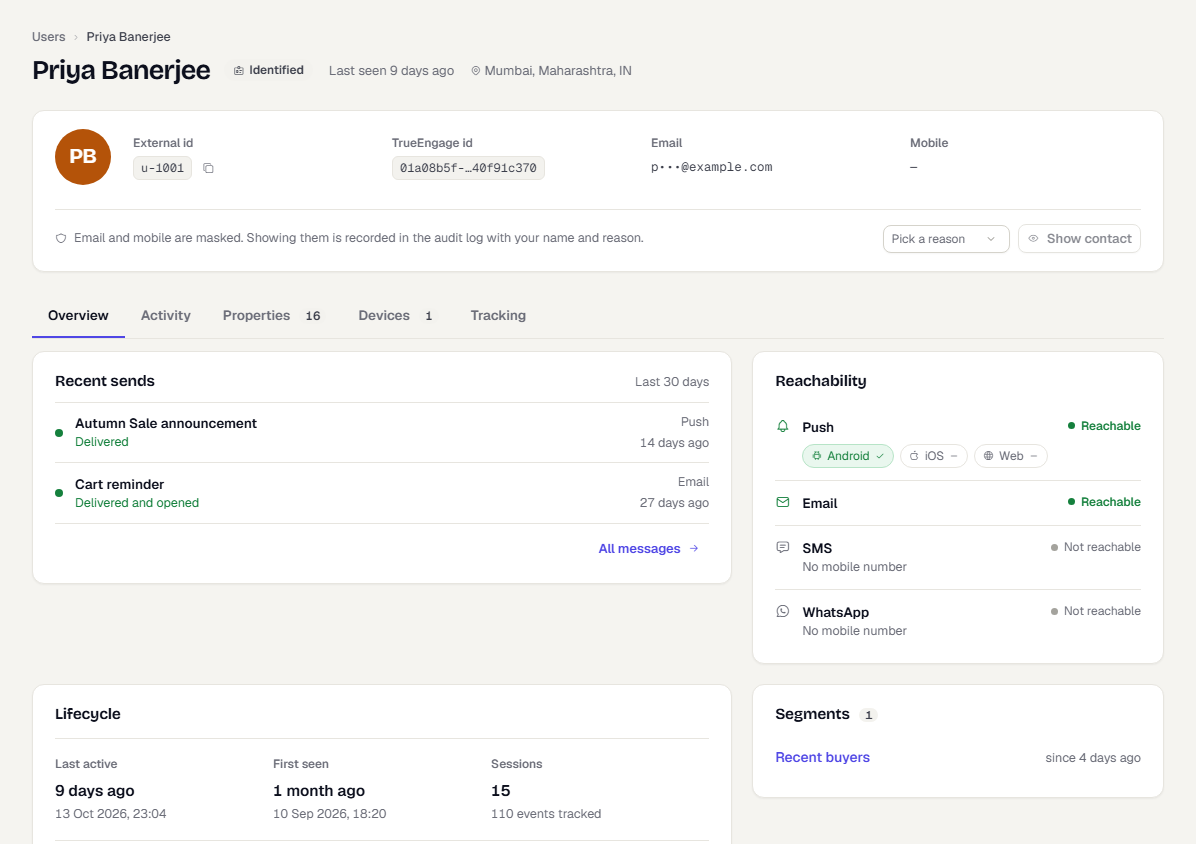
- Open your site with a
test_key and click through a page or two. - In the console, switch to Test and go to Audience → Users.
- Search for the id you passed to
identifyand open the profile. - Check the activity list for
Page Viewedand your own events.
Troubleshooting
| Symptom | Likely cause and fix |
|---|---|
| No user in the console | You are looking at the wrong environment. A test_ key writes to Test only. |
| Nothing is sent, no errors | optOutByDefault is on and optIn() was never called, or the visitor opted out. Check isOptedOut('tracking'). |
| Events stop after a while | The key was rejected. Calls with a bad key pause for one hour. Check the key and getInfo(). |
initialize throws with a test_ key |
You called it again with a different key. Use one key per page load. |
| Event rejected in the console log | The name is reserved, such as Page Viewed. Pick another name. |
| Push prompt never appears | The call was not from a click, the page is not https, or the browser blocked notifications for the site. |
| Push permission is granted but nothing arrives | te-sw.js is not served at the configured path, vapidPublicKey is missing, or the key is not from the same Firebase project as the FCM provider. Open the worker URL in the browser to check it loads. |
Location returns restricted |
The page is plain http, the Geolocation API is missing, or a Permissions-Policy blocks it. Cross-origin iframes need allow="geolocation". |
Was this page helpful?