Push notifications
How push tokens, permission, receipts, clicks and deep links work across Android, iOS, web and Flutter.
Push notifications reach users when your app or site is closed. This page explains how push works the same way on every platform. For setup steps, use your platform guide:
Before you start
- Finish the install and initialize steps in your platform guide.
- Add the push provider for the platform in the console: FCM for Android and web, APNs for iOS. For web, the SDK also needs the Web Push key from the same Firebase project. Live will not use an unverified default provider.
How it works
- The app or browser gets a push token from the operating system or browser.
- The SDK sends the token to TrueEngage and ties it to the user. It sends the token again on every launch, because tokens change.
- A campaign or flow sends a push to that token through your provider.
- The device shows the notification. The SDK records what happens:
Push Received,Push Clicked,Push Dismissed.
Push is one channel. Android, iOS and web are transports for it, and one user can have several devices.
Tokens
| Platform | Token | Notes |
|---|---|---|
| Android | FCM token | Obtained on every launch when push.autoRegister is on. |
| iOS | APNs device token | Pass it with setAPNsToken. You can pass an FCM token with setPushToken(token, provider: "fcm") instead. |
| Web | Browser subscription | Created when permission is granted. |
| Flutter | Android: FCM. iOS: APNs. | Hand over a token from elsewhere with setPushToken. |
logout keeps the token, so the device stays reachable for the next user. reset removes it. Opting out of push removes the subscription on the web. See Consent and opt-out.
Permission
Ask for permission when the value is clear to the user, for example after they place a first order. Do not ask at first launch.
| Platform | Prompt | If the user denies |
|---|---|---|
| Android 13+ | System prompt | The app cannot ask again. Send the user to system settings. |
| Android 12 and earlier | None | Granted by default. |
| iOS | System prompt. provisional delivers quietly with no prompt. |
The app cannot ask again. |
| Web | Browser prompt, only from a click | The site cannot ask again. |
Each SDK has a requestPushPermission method. The result is granted, denied, provisional (iOS) or unavailable. On Android the result is granted or denied.
The SDK records Push Permission Granted and Push Permission Denied when the user decides. Use them to measure your opt-in rate.
Receipts, clicks and dismissals
| Event | When | Where it needs setup |
|---|---|---|
Push Received |
The notification reaches the device | Android: automatic. iOS: needs a notification service extension for background pushes. Web: the service worker records it. |
Push Clicked |
The user taps the notification | Automatic. Recorded before your code runs. |
Push Dismissed |
The user swipes it away | Android, iOS and web. |
Each is recorded once per message, so using the SDK's own handling and your own calls together is safe.
Click-through rate is clicks divided by delivered pushes.
Payload rules
- Campaign pushes carry a
teblock withmessageId,campaignId,variantCode,deeplinkandcollapseKey. The SDK reads it. Do not remove it. - On Android, pushes are data-only. Do not add a
notificationblock to messages you send yourself for TrueEngage. With one, Android shows the push itself in the background and the SDK never sees it, so you lose the receipt and click attribution. - On iOS, images need the notification service extension.
- On the web, the payload has
title,body, optionalicon,image,urlandbuttons, and theteblock.
Coloured and bold text (Android)
A push title or message can carry bold, italic, underline and coloured words, for example one orange word in the title. This shows on Android SDK 0.9.0 and later, and on Flutter 0.9.0 and later for Android devices. Every other platform, and older Android SDKs, show the same text as plain words, with no stray tags.
You style the text in the template editor. See Write the content for each channel. The plain text is what appears in previews, test sends, the notification inbox, logs and analytics. If the styled text would make the payload too large, the push is sent as plain text rather than dropped.
The iOS and Web SDKs are unchanged by this feature.
Action buttons and sound
A push template can carry up to three action buttons and a sound. See Write the content for each channel for the template fields.
- Buttons. Each button has a label, and optionally an action id and a deep link. A tap records
Push Clickedwith the button'sactionIdandactionLabel. The click payload'sdeeplinkis the button's link, or the notification's link when the button has none, so code that routesdeeplinkfollows buttons with no change.- Android shows them as notification actions. The button link opens only when your app handles it.
- iOS needs the notification service extension. The helper registers a category for the push's buttons just before it is shown. Without the extension the push shows no buttons. If your app calls
setNotificationCategories, call it once at launch, because it replaces the whole set. - Web shows buttons where the browser supports them. Chrome shows the first two or so, and Safari shows none.
- Flutter follows the native platform.
TEPushPayload.buttonsandactionIdare available, andtrackPushClicked(data, actionId:)records a tap on a notification your app draws itself.
- Sound. The sound is the name of a file bundled in your app:
res/raw/<name>on Android, and a file such aschime.cafon iOS. An unknown name plays the default sound. Android makes one extra notification channel for each custom sound.
Buttons and sound need SDK 0.6.0 or later.
Clicks and deep links
A push can carry a deep link: a path or URL that opens a particular screen. When the user taps:
- The SDK records
Push Clicked. - The app opens. On Android it opens through the deep link if your app handles it, otherwise on the launcher activity. On the web the worker opens the link, and only links on your own site are allowed.
- Your code receives the tap so you can route in the app.
Listen for the tap:
// Android
TrueEngage.setEventListener { type, payload -> /* pushClicked */ }
// iOS
TrueEngage.setEventListener { type, payload in /* pushClicked */ }
// Web
TrueEngage.on('pushClicked', (p) => router.push(p.deeplink ?? '/'));
// Flutter
TrueEngage.onPushClicked.listen((p) {
  if (p.deeplink != null) router.go(p.deeplink!);
});
A tap that starts the app from a closed state is held until you add your listener, so you do not miss it.
Using another push library
Libraries such as firebase_messaging can take over message handling. Then forward pushes and taps to TrueEngage so receipts and clicks are still recorded:
| Platform | Record a received push | Record a tap |
|---|---|---|
| Android | PushHandler.handle(context, data) |
TrueEngage.trackPushClicked(data) |
| iOS | TrueEngage.handlePushPayload(userInfo) |
TrueEngage.handleNotificationResponse(response) or trackPushClicked(userInfo:) |
| Flutter | TrueEngage.handlePushPayload(data) |
TrueEngage.trackPushClicked(data) |
Verify it works
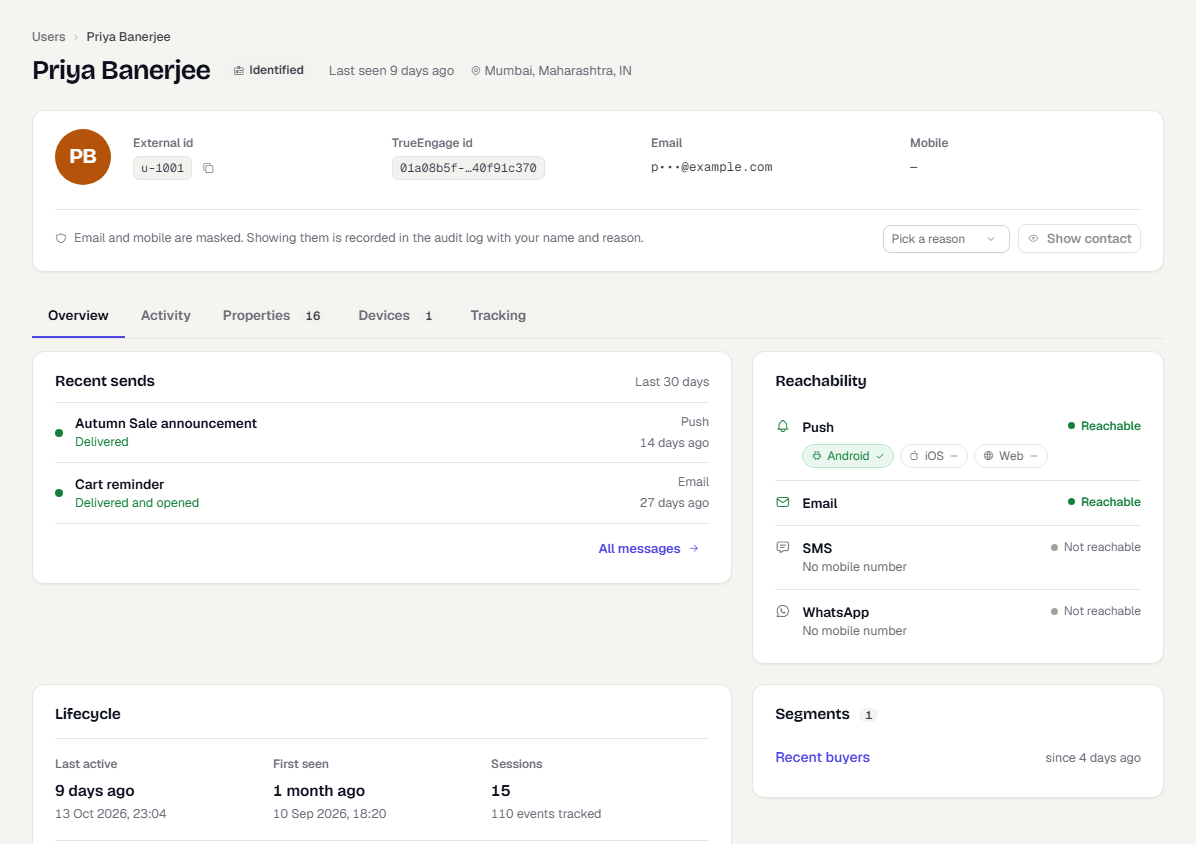
- Register a test device with a
test_key and allow notifications. - In the console, switch to Test and go to Audience → Users. Open the profile.
- Check the activity list for
Push Token RegisteredandPush Permission Granted. - Send a test push to the device from a template or campaign. Add your device to the Test allowlist under Channels → Delivery Controls first.
- Tap it, then refresh the profile for
Push ReceivedandPush Clicked.
Troubleshooting
| Symptom | Likely cause and fix |
|---|---|
No Push Token Registered |
Permission not granted, or the platform setup is incomplete (Firebase file, capability, service worker). |
| Token registered, push never arrives | The provider credentials are missing or unverified, or the Test allowlist does not include the device. |
Push shows, no Push Received |
Android: a notification block or another library handles it. iOS: no notification service extension. |
| Tap does nothing in the app | You have not added a listener, or the deep link is not handled by your router. |
| User on a second device gets nothing | Each device registers its own token. Check that the second device allowed notifications. |
Was this page helpful?