Events, attributes and identity
Naming rules, property types, reserved events and attributes, and how anonymous and identified users merge.
This page covers the rules that apply to every SDK. Follow them and your segments, campaigns and reports stay accurate.
Events
An event is something a user did, with optional properties.
TrueEngage.track('Order Placed', { orderId: 'ORD-8891', amount: 2499.5 });
Naming rules
- Use title case with spaces:
Order Placed,KYC Completed. - Use the same name on every platform.
Order Placedon Android andorderPlacedon iOS become two different events. Segments then miss half your users, and nothing reports an error. - Name the event for what happened, in past tense:
Cart Viewed,Subscription Renewed. - Agree on a list of event names before you write platform code.
- Names are limited to 100 characters. Longer names are cut.
- Do not use a reserved name. See Reserved events.
TrueEngage does not force title case, but the convention keeps names consistent across your team.
Property types
| Type | Examples | Notes |
|---|---|---|
| String | 'ORD-8891' |
Up to 1,000 characters. Longer values are cut. |
| Number | 2499.5, 3 |
Integers and decimals. |
| Boolean | true |
|
| Date | new Date(), Date(), DateTime.now() |
Sent as a date and time. |
| List of strings | ['footwear', 'sale'] |
Up to 100 items. |
| List of numbers | [1, 2, 3] |
Up to 100 items. |
TrueEngage decides a property's type the first time it sees it. After that, the type does not change.
If you send amount: 2499.5 once and amount: "2499.50" later, the property stays a string forever. Number filters and sums on it stop working. Keep each property to one type. In debug builds the SDK logs a warning the first time a type differs from what it sent before. It still sends the value.
Limits
| Limit | Value | When exceeded |
|---|---|---|
| Event name | 100 characters | Cut, with a warning |
| Property name | 100 characters | Cut, with a warning |
| String value | 1,000 characters | Cut, with a warning |
| Properties per event | 50 | Extras are dropped, with a warning |
| List length | 100 items | Cut, with a warning |
| Event size | 32 KB | The event is dropped, with an error |
Non-interactive events
An event sent with nonInteractive set does not start or extend a session. Use it for work the user did not do, such as a background sync, so a dormant user does not look active.
User attributes
Attributes describe the user: plan, city, lifetime value. They are saved on the profile, and the latest value wins. Only changed values are sent.
TrueEngage.setUserAttribute('lifetimeValue', 48200);
TrueEngage.setUserAttributes({ plan: 'pro', city: 'Indore' });
TrueEngage.removeUserAttribute('trialEndsAt');
The same type rules apply to attributes. Attributes are cleared on logout.
userId is not allowed as an attribute name. Use identify for the user's id.
Reserved attributes
Reserved attributes have meaning in TrueEngage, so you set them with dedicated setters. The generic setUserAttribute rejects them.
| Attribute | Setter | Value |
|---|---|---|
email |
setEmail |
Email address |
phone |
setPhone |
E.164 format, such as +919876543210. Not reformatted. |
firstName |
setFirstName |
String |
lastName |
setLastName |
String |
gender |
setGender |
String |
birthDate |
setBirthDate |
Date |
city |
setCity |
String |
region |
setRegion |
State or province |
countryCode |
setCountryCode |
ISO 3166-1 alpha-2, such as IN |
timezone |
setTimezone |
IANA name, such as Asia/Kolkata |
locale |
setLocale |
BCP 47 tag, such as en-IN |
You can also pass reserved attributes in the attributes argument of identify.
Reserved events
The SDK sends these events for you. You cannot send them with track. An attempt is rejected and logged as an error.
| Event | When |
|---|---|
App Installed |
First launch after install (Android, iOS) |
App Opened |
A new session starts, not every return to the foreground |
App Backgrounded |
The app moves to the background (Android, iOS) |
App Updated |
The app version changed (Android, iOS) |
App Reinstalled |
A reinstall is detected (Android, iOS) |
Session Started, Session Ended |
A session begins or ends |
Screen Viewed |
You call trackScreen (Android, iOS, Flutter) |
Page Viewed |
A page loads or the route changes (web) |
User Logged Out |
You call logout |
Push Permission Granted, Push Permission Denied |
The user answers the permission prompt |
Push Token Registered |
A token or subscription is registered |
Web Push Subscribed |
A browser subscribes (web) |
Push Received, Push Clicked, Push Dismissed |
Push activity |
Location Permission Granted, Location Permission Denied |
The user answers the location prompt |
$acquisition |
A link or ad click that carries campaign or click ids opens the app or site. See See where each user came from |
TrueEngage also creates events from message delivery and campaign activity, such as Email Delivered and Flow Entered. You can use all of these in segments and flows.
Identity
Each device starts anonymous. The SDK gives it two generated ids:
| Id | Meaning | Lifetime |
|---|---|---|
| Anonymous id | A visitor before sign-in | Until reset or uninstall |
| Device id | This install of your app or browser | Until uninstall |
When the user signs in, you give TrueEngage your own id for them, the external id.
identify
TrueEngage.identify('u-1001', { email: 'priya@example.com', firstName: 'Priya' });
- Call it right after sign-in or sign-up. Use the id from your own database, not an email address that can change.
- Events tracked before sign-in stay in the queue. TrueEngage merges them into the identified profile.
- Calling
identifyagain with the same id does nothing. - Calling it with a different id, without
logoutfirst, is treated as a user switch: the session ends and a fresh one starts. This usually means a missinglogout. identifyand the events you track right after it travel in the same batch, in order.
logout and reset
| Call | What it does |
|---|---|
logout |
Ends the session. Clears the external id and user attributes. Sends User Logged Out. Keeps the anonymous id, device id and push token, so the device stays reachable. |
reset |
Full wipe. New anonymous id, queue cleared, push token removed. Use it for "delete my data" flows. |
Use logout when a user signs out. Do not delete the push token yourself. Another user may sign in on the same device.
What a merge does
When a device identifies as u-1001, TrueEngage looks for an existing profile with that external id. If it finds one, it merges the anonymous history into it. If the same person signs in on a second device, both devices end up on the same profile. TrueEngage records a User Merged event.
Merging takes a moment. If a campaign triggers on Login Successful and you send it at once, it may run against a profile that does not have an email yet. Give login and sign-up triggers a delay of 5 to 10 minutes.
Provisional ids and identity promote
Some apps know a person before they are a customer, such as a lead during onboarding. You identify them with a temporary external id, for example lead:9f3c21. Later the business issues a permanent id, such as a client code C10093.
Move the profile onto the permanent id with your server, not the app:
POST /v1/users/identity/promote
Authorization: Bearer YOUR_SERVER_KEY
Content-Type: application/json

{
  "fromExternalId": "lead:9f3c21",
  "toExternalId": "C10093"
}
- The server key needs the
data.merge_userscope. Create it on the API Keys page of the console (under Settings), and never ship it in an app. - The profile keeps its history and moves onto
C10093. - If another profile already holds
C10093, the two are merged. - Both ids keep resolving afterwards, so an app still sending
lead:9f3c21is not affected. - The call is safe to repeat. The result is
linked,mergedornoop.
After promotion, switch the app to identify('C10093') at its next sign-in.
Verify it works
- Call
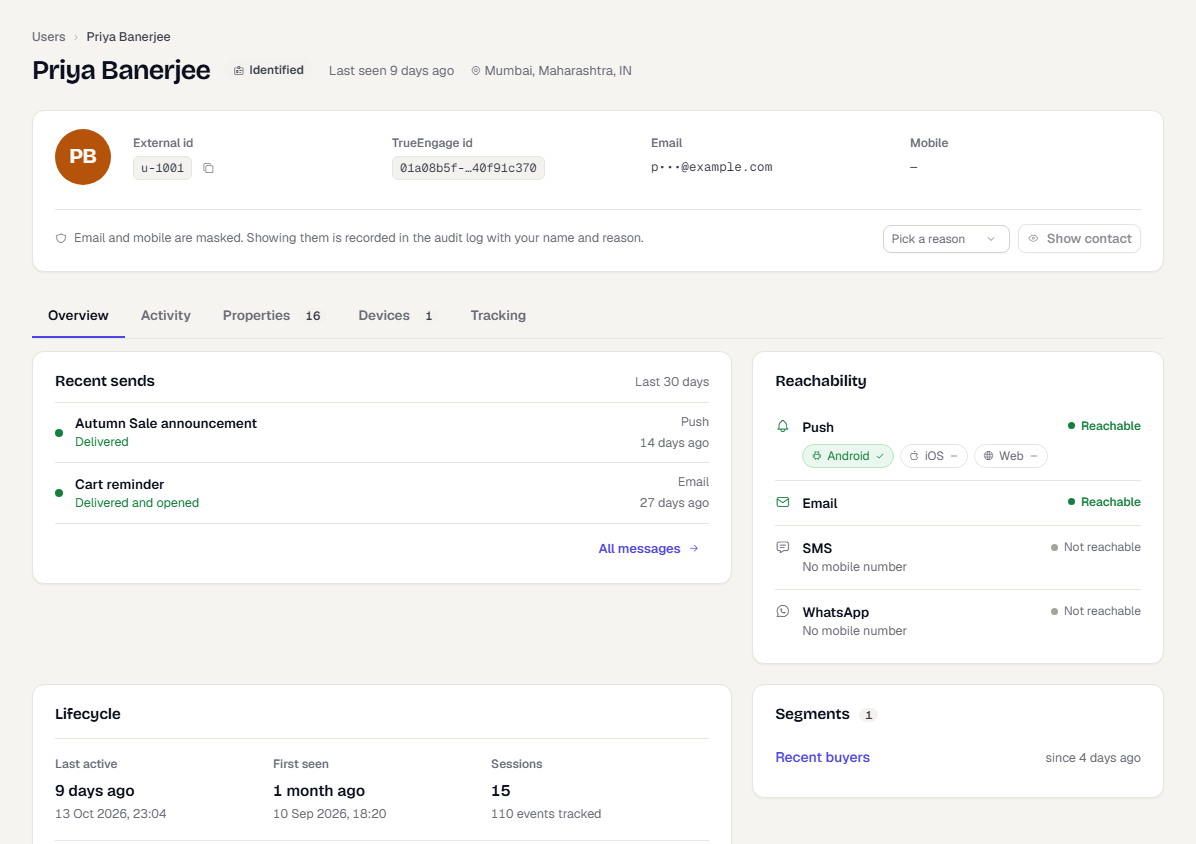
identifywith a test id such asu-1001, then track an event. - In the console, switch to Test and go to Audience → Users.
- Search for
u-1001and open the profile. - Check that your attributes are set and the events appear in the activity list in order.
Was this page helpful?