Flutter SDK
Install the TrueEngage Flutter SDK, track events and screens, identify users and set up push on Android and iOS.
Use the Flutter SDK (trueengage_flutter, version 0.8.1) to track events and users in a Flutter app and to send push notifications on Android and iOS.
The Dart code only passes your calls to the native Android and iOS SDKs. The queue, batching, retries, sessions and storage all run natively, so events are never reordered and behavior matches the native apps. Flutter Web is not supported. For a website, use the Web SDK.
Before you start
- An app key for your app. Use a
test_key in debug builds. See Test and Live keys. - Flutter 3.10 or later, Dart 3.5 or later, Android 7.0 (API 24) or later, iOS 14 or later.
- For push: the native setup for each platform, described below.
Install
Add the package to pubspec.yaml:
dependencies:
  trueengage_flutter: ^1.0.0
Then run flutter pub get.
Initialize
Initialize first thing in main().
import 'package:flutter/foundation.dart';
import 'package:flutter/widgets.dart';
import 'package:trueengage_flutter/trueengage_flutter.dart';

Future<void> main() async {
  WidgetsFlutterBinding.ensureInitialized();
  await TrueEngage.initialize(const TEConfig(
    appKey: kReleaseMode ? 'live_xxxxxxxx' : 'test_xxxxxxxx',
    dataRegion: DataRegion.india,
  ));
  runApp(const App());
}
initialize makes no network call. Anything tracked before it returns is queued and replayed. TrueEngage.isInitialized tells you if it has run.
Configuration
TEConfig takes these named parameters. Only appKey is required.
| Parameter | Type | Default | Meaning |
|---|---|---|---|
appKey |
String | none | test_… or live_…. Selects the environment. |
apiHost |
String? | region host | Full base URL. Overrides dataRegion. |
dataRegion |
DataRegion (india) |
india |
Picks the API host. India is the only data region today. |
logLevel |
LogLevel (none, error, warn, info, verbose) |
verbose in debug, error in release |
Logging. |
optOutByDefault |
bool | false |
Collect nothing until optIn(). |
flushIntervalSeconds |
int | 30 |
Seconds between timed flushes. |
flushBatchSize |
int | 50 |
Flush when this many items wait. |
maxQueueSize |
int | 10000 |
Items kept before the oldest are dropped. |
sessionTimeoutMinutes |
int | 30 |
Idle time that ends a session. |
push |
TEPushConfig |
defaults | See below. |
screenTracking |
bool | false |
Automatic native screen tracking. Call trackScreen from your router instead. |
flushOnOptOut |
bool | true |
On opt-out, send what is queued first. false deletes it. |
appGroup |
String? | none | iOS only. App Group shared with the notification service extension. |
locationPrompt |
String | 'manual' |
'manual' or 'auto'. See Device location. |
locationRefreshHours |
int | 4 |
Minimum hours between location fixes. |
TEPushConfig parameters: autoRegister (default true), requestPermissionOnInit (default false), notificationChannelId, notificationChannelName, smallIconResource and accentColor (an 0xAARRGGBB int). The last four apply to Android only.
Identify and log out
TrueEngage.identify('u-1001', {'firstName': 'Priya', 'plan': 'pro'});
TrueEngage.logout(); // ends the session, keeps the push token
TrueEngage.reset();  // full wipe: new anonymous id, queue cleared
Call identify after sign-in with the same id you use in your own systems. Call logout on sign-out. See Events, attributes and identity.
Track events and screens
TrueEngage.track('Order Placed', {
  'orderId': 'ORD-8891',
  'amount': 2499.50,
  'itemCount': 3,
  'isFirstOrder': true,
  'placedAt': DateTime.now(),
  'categories': ['footwear', 'sale'],
});

TrueEngage.track('Sync Finished', {'rows': 120}, true); // third argument: nonInteractive

TrueEngage.trackScreen('Checkout'); // Screen Viewed
Each value crosses to the native side with a type tag, so a DateTime arrives as a date and not a string. For full control, use TEProperties:
TrueEngage.track('Order Placed', TEProperties()
  ..setNumber('amount', 2499.50)
  ..setDate('placedAt', DateTime.now())
  ..setStringList('categories', ['footwear']));
Call trackScreen from a router observer. TrueEngage.flush() sends the queue now. You rarely need it.
User attributes
TrueEngage.setUserAttribute('lifetimeValue', 48200);
TrueEngage.setUserAttributes({'plan': 'pro', 'city': 'Indore'});
TrueEngage.removeUserAttribute('trialEndsAt');
Reserved attributes have their own setters:
TrueEngage.setEmail('priya@example.com');
TrueEngage.setPhone('+919876543210'); // E.164, not reformatted
TrueEngage.setFirstName('Priya');
TrueEngage.setLastName('Sharma');
TrueEngage.setGender('female');
TrueEngage.setBirthDate(DateTime(1995, 4, 12));
TrueEngage.setCity('Indore');
TrueEngage.setRegion('Madhya Pradesh');
TrueEngage.setCountryCode('IN');
TrueEngage.setTimezone('Asia/Kolkata');
TrueEngage.setLocale('en-IN');
Set up push
Ask for permission at a good moment, not on first launch. A user who denies it cannot be asked again on iOS or on Android 13 and later.
final result = await TrueEngage.requestPushPermission();
// PushPermission.granted | denied | provisional | unavailable
Listen for taps. Push Clicked is recorded natively before your listener runs. A tap that starts the app is buffered until you listen.
TrueEngage.onPushClicked.listen((p) {
  if (p.deeplink != null) router.go(p.deeplink!);
});
TrueEngage.onTokenRegistered.listen((token) => debugPrint(token));
The other streams are onPushReceived, onPushDismissed and onPushPermissionChanged. A TEPushPayload has messageId, campaignId, variantCode, deeplink, collapseKey, title, body and data.
If you get a token from somewhere else, such as firebase_messaging on iOS, hand it over:
TrueEngage.setPushToken(token, provider: PushProvider.fcm);
Android setup
- Add
google-services.jsonand the Google Services Gradle plugin to your app. - Upload your FCM credentials to the Android provider in the console.
- Send campaign pushes as data-only messages. A
notificationblock makes Android show the push itself in the background, and the SDK never sees it.
The plugin declares a messaging service and a receiver that records Push Received. If your app already has a messaging service, such as the one in firebase_messaging, only one service handles each message. Forward payloads as shown next.
iOS setup
Add the Push Notifications capability. Add Background Modes → Remote notifications for silent pushes.
Upload your APNs key to the iOS provider in the console.
Add a Notification Service Extension target, with an App Group shared with the app. Without it, iOS cannot report
Push Received.import trueengage_flutter import UserNotifications class NotificationService: UNNotificationServiceExtension { override func didReceive(_ request: UNNotificationRequest, withContentHandler contentHandler: @escaping (UNNotificationContent) -> Void) { TENotificationServiceHelper.didReceive(request, appGroup: "group.com.acmeshop.app", contentHandler: contentHandler) } }Pass the same group in the configuration:
TEConfig(appKey: …, appGroup: 'group.com.acmeshop.app').
With firebase_messaging and flutter_local_notifications
Every call below records at most once for each message, so overlapping paths are safe.
@pragma('vm:entry-point')
Future<void> _onBackgroundMessage(RemoteMessage message) async {
  await TrueEngage.handlePushPayload(message.data, display: false);
}

FirebaseMessaging.onBackgroundMessage(_onBackgroundMessage);
FirebaseMessaging.onMessage.listen((m) async {
  await TrueEngage.handlePushPayload(m.data, display: false);
  await localNotifications.show(m.hashCode, m.data['title'], m.data['body'], details,
      payload: jsonEncode(m.data));
});
FirebaseMessaging.onMessageOpenedApp.listen((m) => TrueEngage.trackPushClicked(m.data));
final initial = await FirebaseMessaging.instance.getInitialMessage();
if (initial != null) TrueEngage.trackPushClicked(initial.data);

await localNotifications.initialize(settings, onDidReceiveNotificationResponse: (r) {
  if (r.payload != null) {
    TrueEngage.trackPushClicked(jsonDecode(r.payload!) as Map<String, dynamic>);
  }
});
Use display: false when your app draws the notification. Without flutter_local_notifications, leave display at its default and the SDK shows the push on Android. On iOS, display is ignored because iOS shows alert pushes itself. Both methods return false for pushes that do not come from TrueEngage.
Smart links and deep links
Smart links arrive on one stream. The SDK resolves the link and hands the result to your app, which decides where to go. It never navigates.
TrueEngage.onDeepLink.listen((link) {
  final path = link.deepLinkValue;   // for example "/product/42"
  if (path == null) return openHome();
  router.go(path);
});
- The stream fires once per open, including the deferred match after a first install. It is held until the first listener attaches, so attach right after
initialize. - Declare the links natively: an
autoVerifyintent filter on Android andapplinks:entries in Associated Domains on iOS, using the hosts from Smart Links, then Domains. With UIScene on iOS, forward links from yourSceneDelegate. - Turn off Flutter's built-in deep linking (
flutter_deeplinking_enabledon Android,FlutterDeepLinkingEnabledon iOS), or your app navigates twice.
See Deep links and deferred deep links for the full setup.
Create links in the app
try {
  final link = await TrueEngage.createLink(deepLinkValue: '/product/42', channel: 'invite');
  Share.share(link.url);
} on TrueEngageLinkException catch (e) {
  // e.error: disabled | rateLimited | invalid | network
}
Turn on in-app links in Smart Links, then Settings first. See Links API and webhooks.
Ad click capture
The native SDKs record one touch when the app opens from a link, or on Android from the Play install referrer, that carries utm_*, gclid, gbraid, wbraid, fbclid or similar parameters. No Dart code is needed, and nothing is recorded while tracking is opted out. To help Google Analytics 4 match app events, pass your Firebase id:
TrueEngage.setFirebaseAppInstanceId(await FirebaseAnalytics.instance.appInstanceId);
On Android, to include the advertising id, add play-services-ads-identifier and the AD_ID permission. On iOS, show your own App Tracking Transparency prompt and add NSUserTrackingUsageDescription. See See where each user came from.
Location
Location is off unless you turn it on. Your app declares the permission and shows its own explanation first:
- Android: add
<uses-permission android:name="android.permission.ACCESS_FINE_LOCATION" />to your app manifest. - iOS: add
NSLocationWhenInUseUsageDescriptionto Info.plist.
final status = await TrueEngage.requestLocationPermission();
// 'granted' | 'denied' | 'restricted' | 'not_requested'
final stored = await TrueEngage.updateLocation(); // true if a fix was stored
See Device location.
Consent and opt-out
TrueEngage.optOut();                    // everything; saved across restarts
TrueEngage.optOutOf(OptOutScope.push);  // tracking | push | inApp | all
TrueEngage.optIn();
TrueEngage.optInTo(OptOutScope.push);
final out = await TrueEngage.isOptedOut(OptOutScope.tracking);
See Consent and opt-out.
Clearing ad identifiers
The native SDKs tell TrueEngage to delete the stored advertising id when the user limits ad tracking (Android) or App Tracking Transparency stops being authorised (iOS), when the id is reset or changes, when you pass null to setAdvertisingIdentifier or setFirebaseAppInstanceId, and when you call optOut. It happens automatically, only for ids reported before, and needs no Dart code. Requires SDK 0.8.1. See When ad identifiers are cleared.
Debug and validate
final info = await TrueEngage.debug.getInfo(); // ids, queue depth, last flush status, counters
TrueEngage.debug.enableValidation();           // debug builds only
Put getInfo() on a debug screen with a copy button. It is the first thing support asks for.
Verify it works
- Run a debug build that uses a
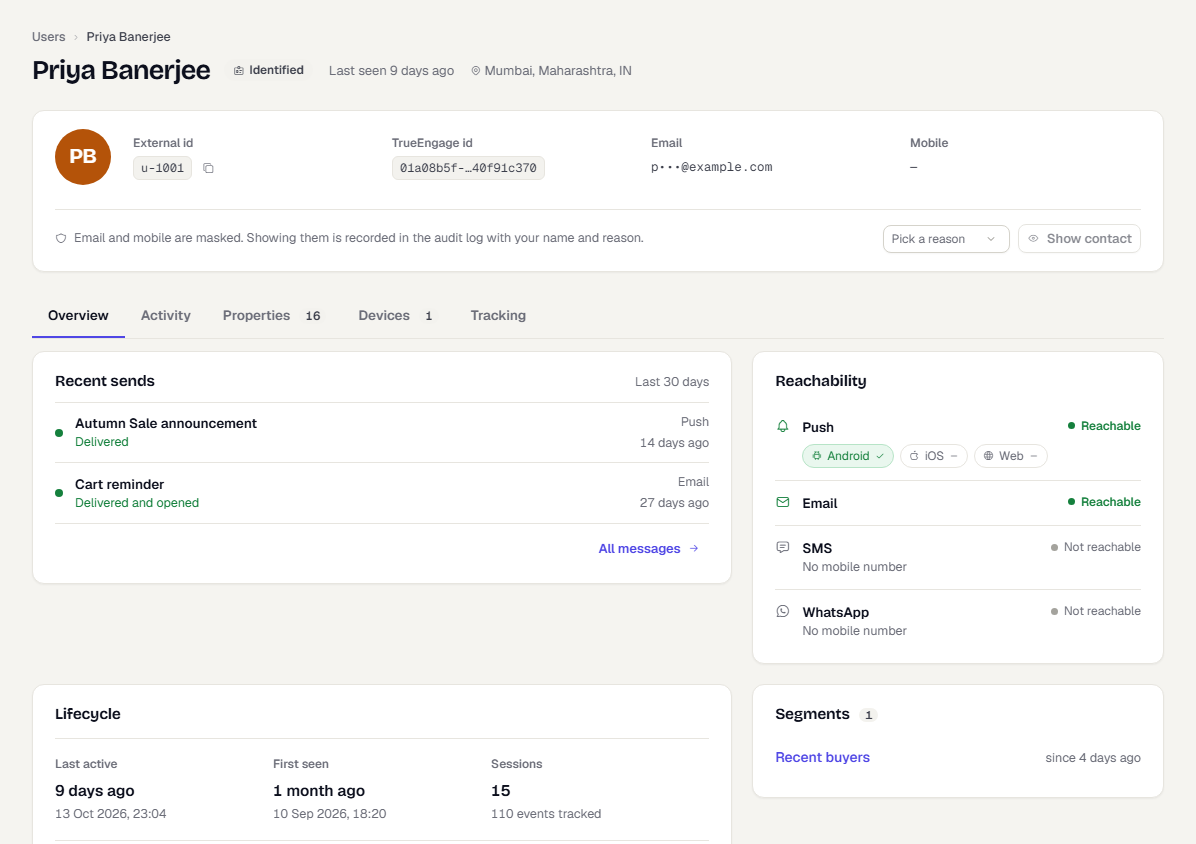
test_key. Open the app and trigger an event. - In the console, switch to Test and go to Audience → Users.
- Search for the id you passed to
identifyand open the profile. - Check the activity list for
App Openedand your own events.
Troubleshooting
| Symptom | Likely cause and fix |
|---|---|
| No user in the console | Wrong environment. A test_ key writes to Test only. |
| Nothing arrives | Offline, or the user opted out. Check debug.getInfo(). |
| Events stop after a while | The key was rejected. The SDK pauses for one hour on a bad key. |
| Android push shows but no receipt or click | The message has a notification block, or another plugin's service handles it. Send data-only messages and forward with handlePushPayload. |
iOS has no Push Received |
Add the notification service extension and set appGroup in both places. |
| Taps are not recorded | A tap went through another plugin. Call trackPushClicked. |
Location returns restricted |
The permission string or manifest entry is missing. |
Was this page helpful?